-
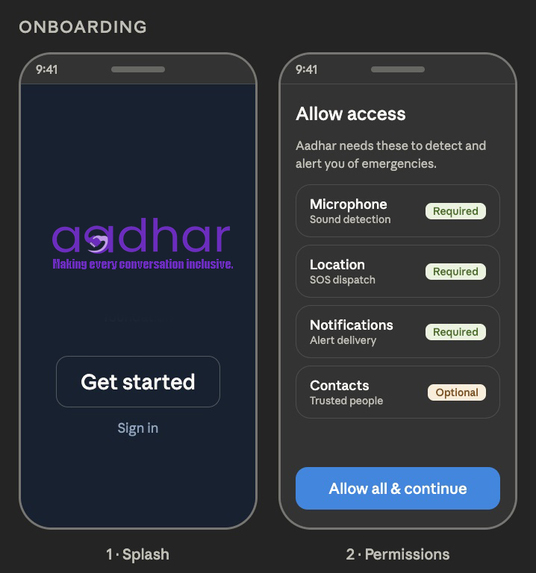
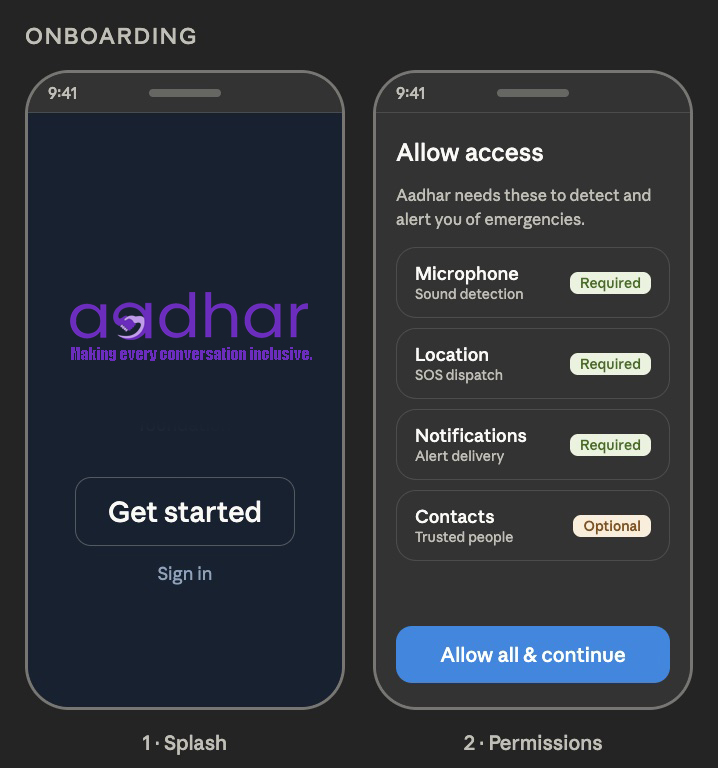
On Boarding
-
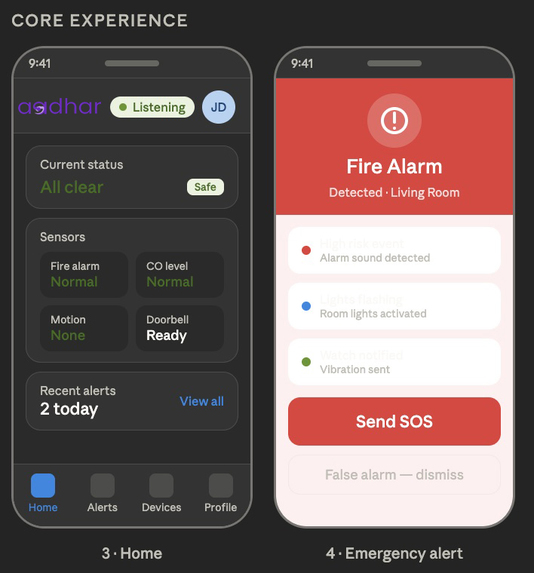
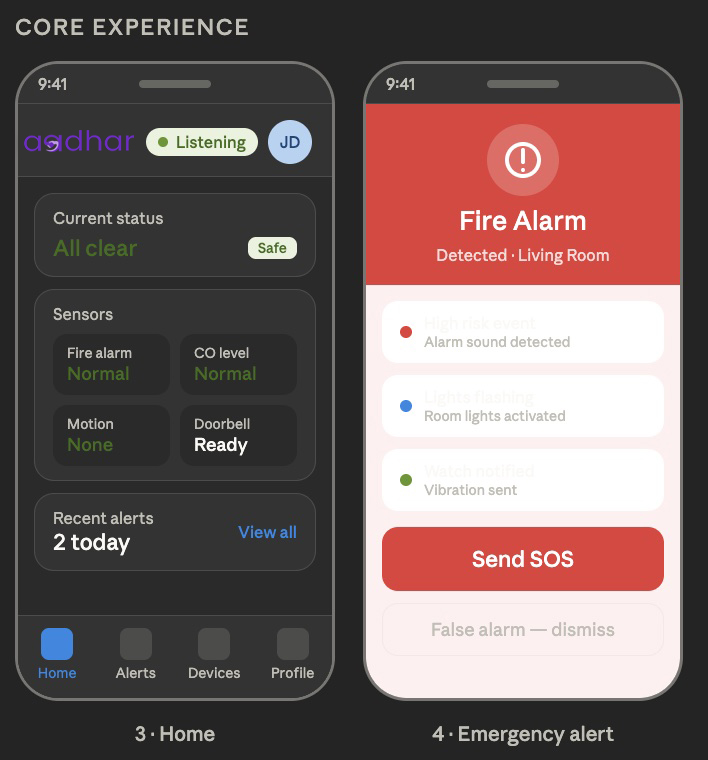
Core Experience
-
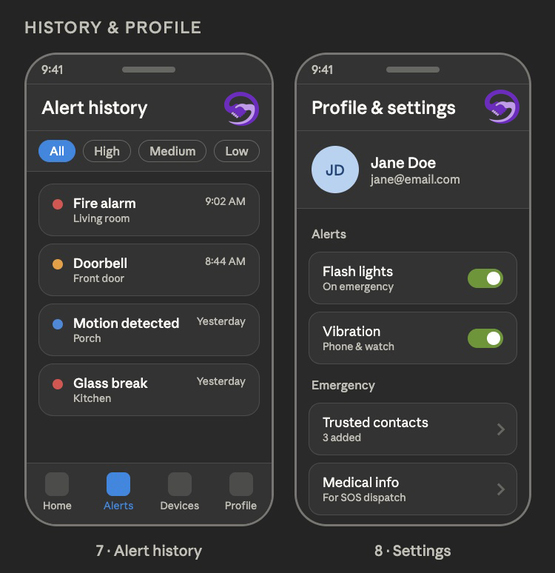
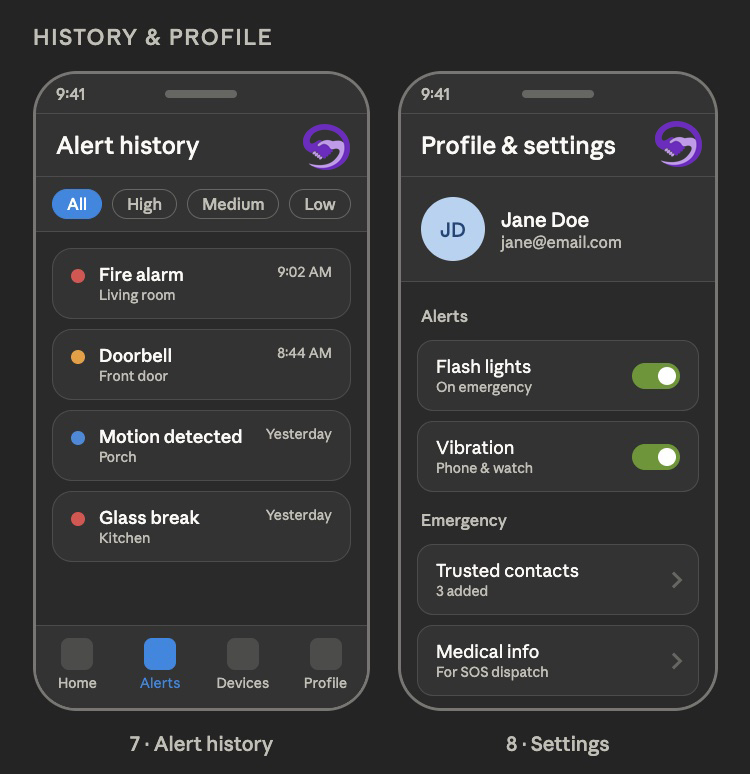
History And Profile
-
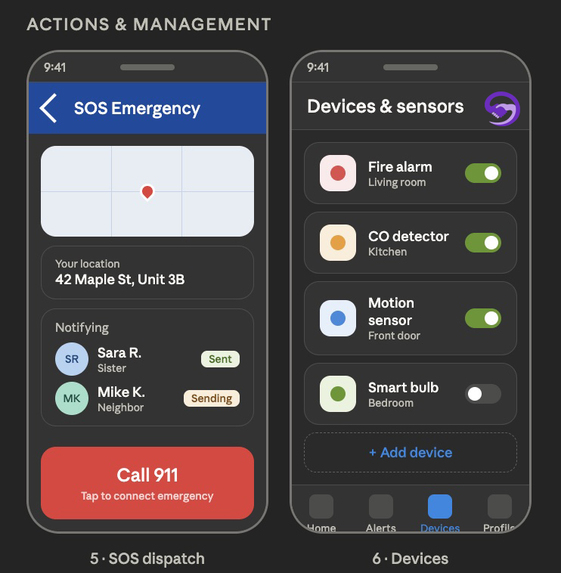
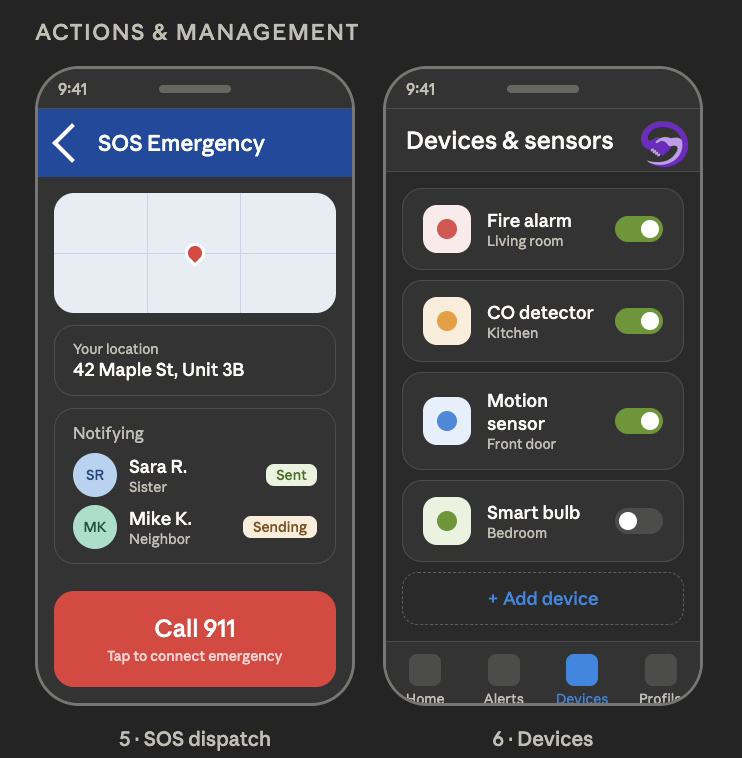
Action and Management
-
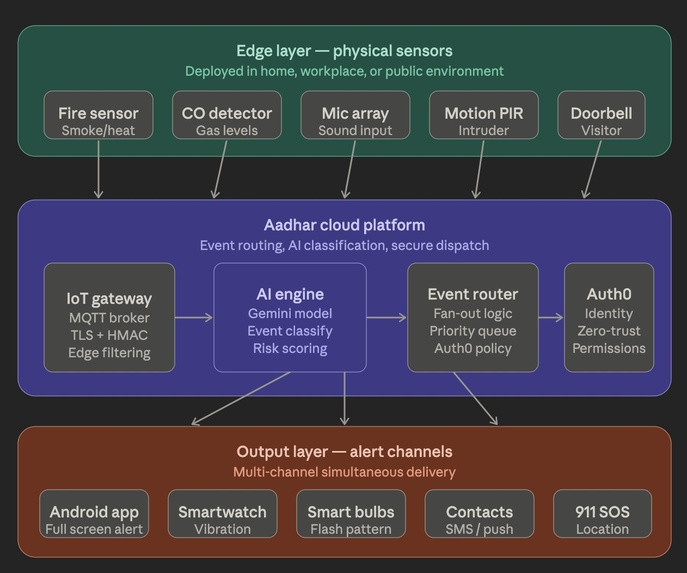
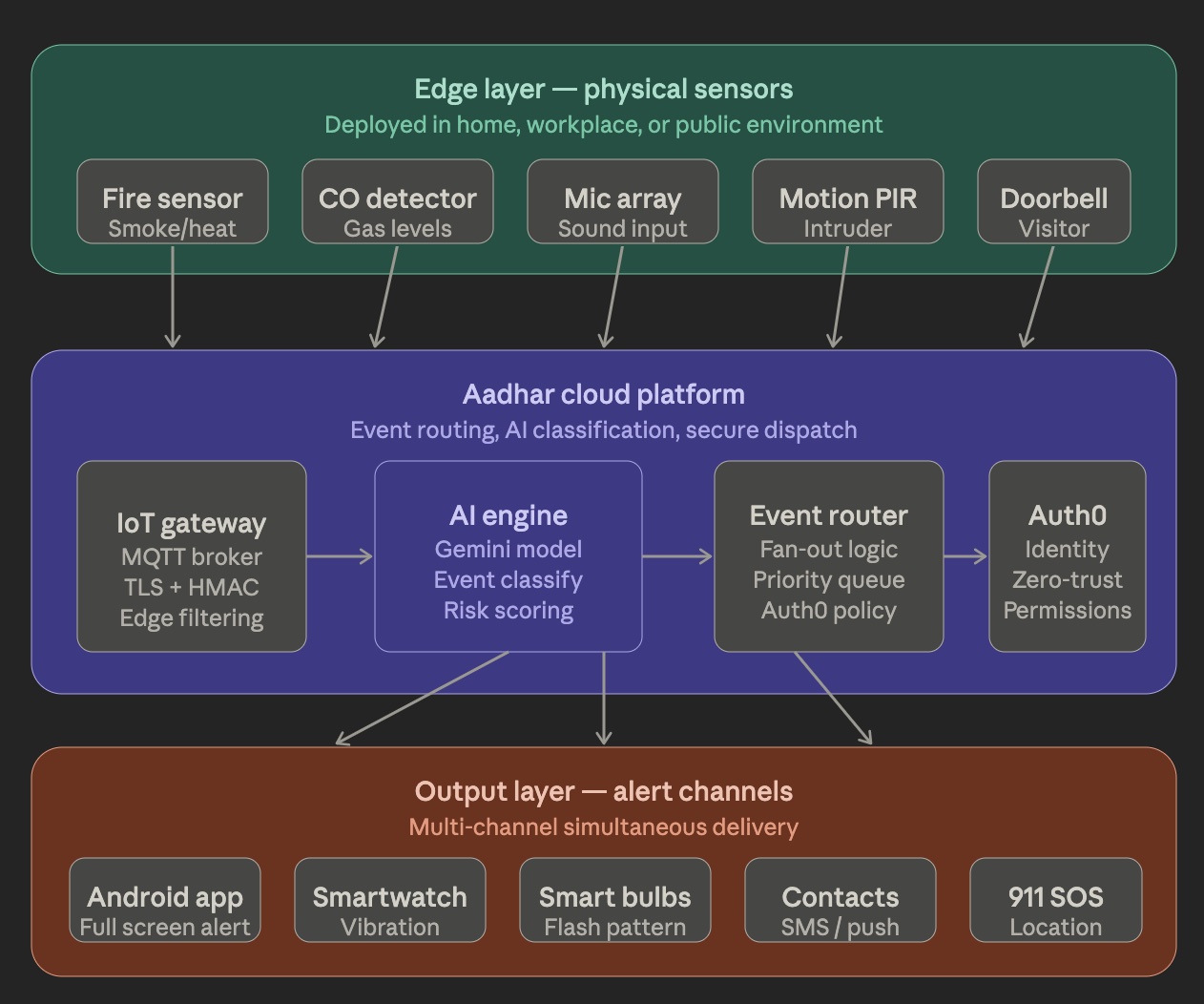
Aadhar IoT architecture - system overview
-
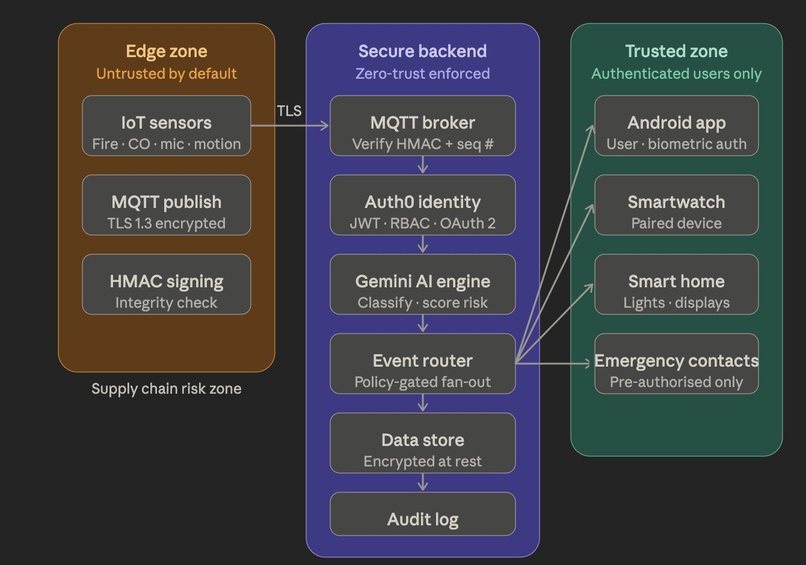
Security Architecture
-
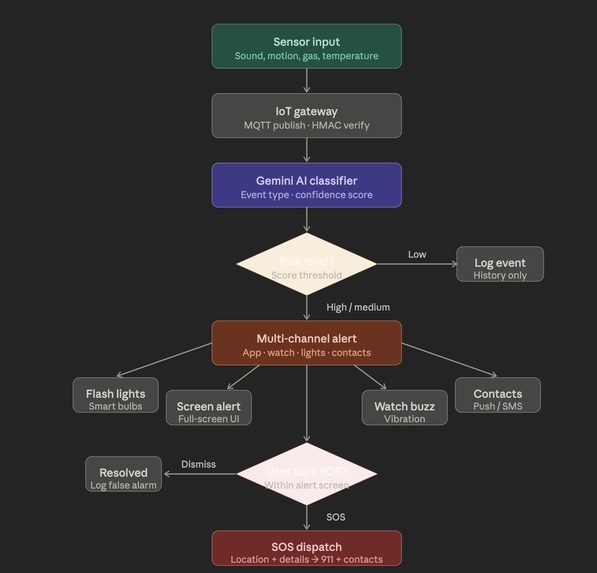
Sequencial Flow
Inspiration
Disabling hearing loss affects 430 million people globally. Our teammate, roommate, or classmate is one among 430 million. In an emergency, a fire alarm, a carbon monoxide leak, or an intruder can be completely inaccessible to them. Existing solutions are fragmented: some wearables vibrate, some smart bulbs flash, but no single app unifies detection, alerting, smart-home control, and emergency dispatch into one accessible interface.
Our goal was to create a full-fledged platform, including an application, that can help deaf communities to improve their living culture: a unified safety backbone that serves as the deaf community's constant hearing substitute. The Hindi term "Aadhaar" means "support foundation." For a community that cannot rely on sound, we set out to create a dependable, multi-layered safety basis.
What We Built
Aadhar is a human-first emergency awareness system designed to help deaf and hard-of-hearing users detect danger, receive alerts instantly, and respond quickly through one unified experience. Instead of relying on sound alone, Aadhar turns emergencies into clear visual, vibration-based, and mobile-friendly actions so users are never left unaware in critical moments.
AI-Powered Detection
Aadhar identifies important emergency and everyday sound and emergency events such as fire alarms, carbon monoxide alarms, sirens, doorbells, baby cries, glass breaks, shouting, and unusual movement. The goal is to give users awareness of situations that may require immediate attention, even when they cannot hear them directly.
Multi-Channel Alerting
When a risk is detected, Aadhar sends alerts through multiple channels at the same time to make sure the message is seen and felt. This includes flashing room lights, a full-screen emergency warning, phone vibration, smartwatch alerts, and a simple color-coded visual signal that clearly communicates the level of urgency.
Emergency SOS Response
Aadhar includes a one-tap SOS feature that can send the user’s location, emergency details, and selected medical information to trusted contacts immediately. This makes it easier for family members, caregivers, or support people to respond quickly and with the right context during an emergency.
Accessibility-First Experience
The entire experience is built around clarity, speed, and ease of use under stress. The interface uses large text, high-contrast colors, simple actions, and visual cues that make it easy to understand what is happening without needing sound or complicated navigation.
How We Built It
We began by mapping the full user journey with a rapid wireframing session that covered every major use case in the app: emergency detection, alert delivery, SOS/emergency response, and accessibility support. This helped us design Aadhar as a complete workflow rather than a collection of separate features. From the start, we focused on keeping the experience simple, fast, and practical enough for real-world use in homes, workplaces, and public environments.
Workflow Design
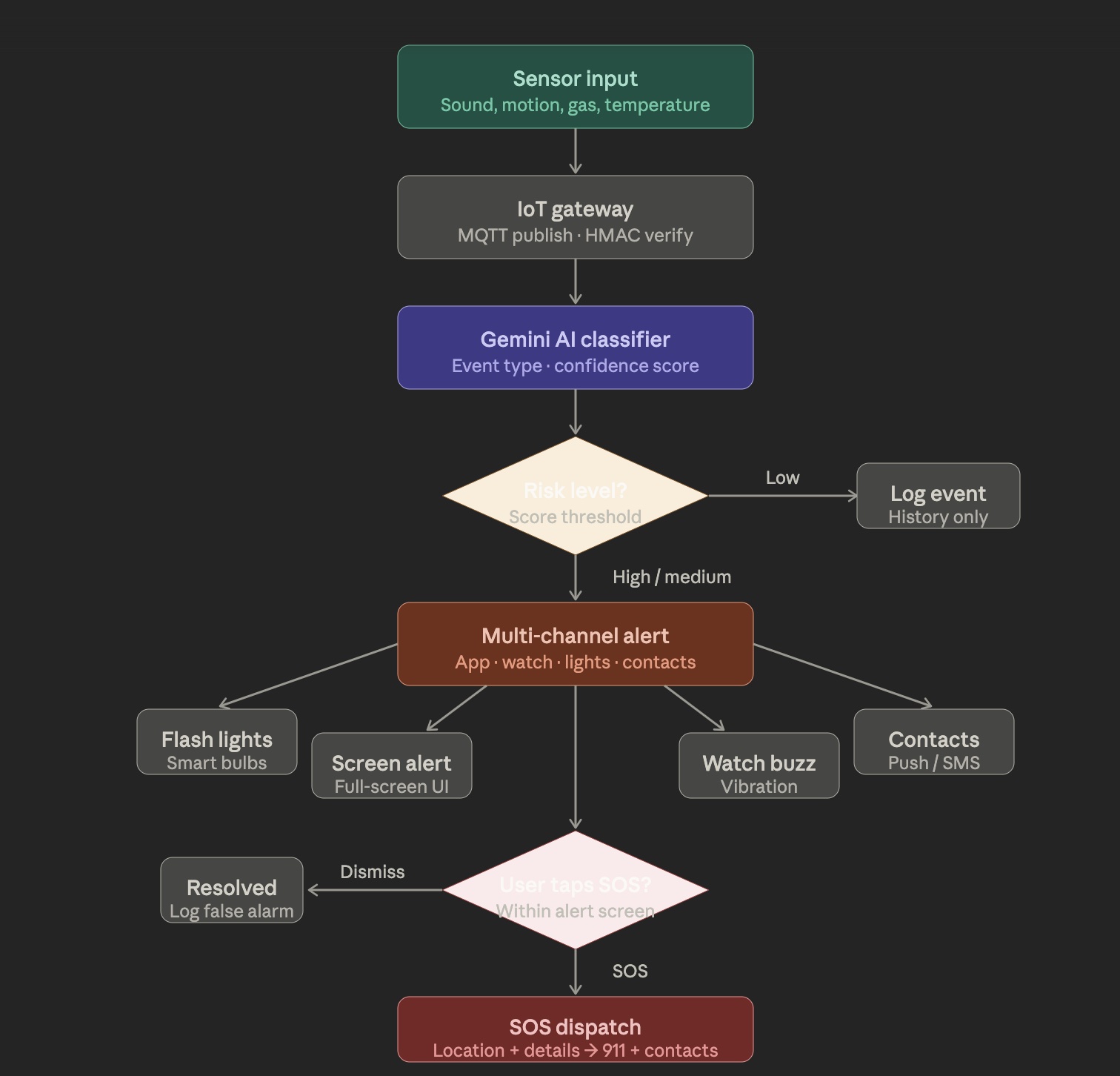
Instead of building isolated screens, we structured Aadhar around one continuous emergency flow:
- A danger is detected.
- The system classifies the event.
- The alert is escalated.
- The user is notified across multiple channels.
- Trusted contacts are informed if help is needed. This no-code-first approach made it easier to think in terms of actions, triggers, and outcomes rather than implementation details.
AI-Assisted Detection
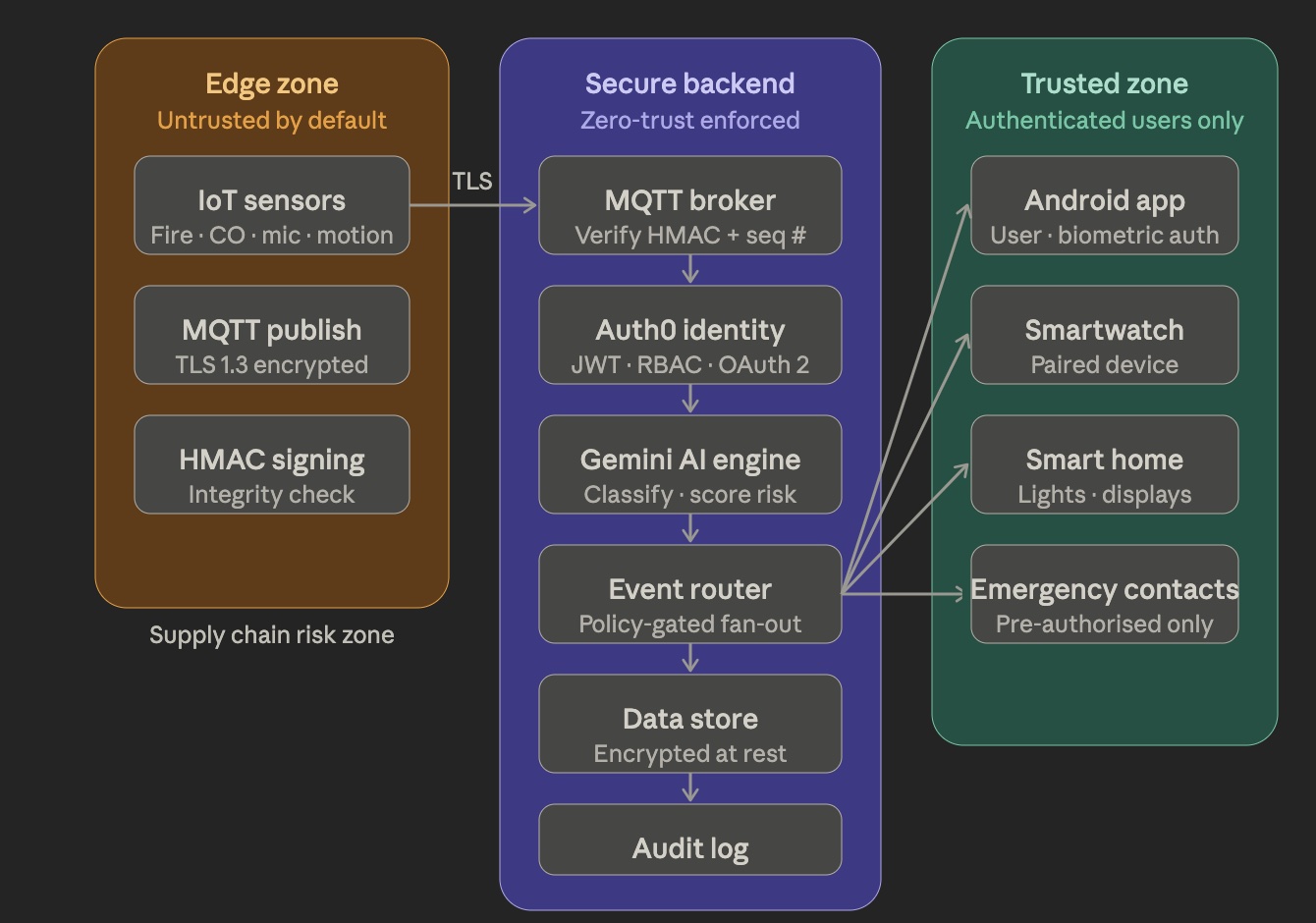
We have Gemini as the intelligence layer for understanding emergency-related inputs such as sound patterns or motion cues. In a no-code setup, this would be configured as an AI decision step that receives input, returns a risk level, and determines what action should happen next. This makes the system flexible enough to handle multiple event types without requiring a separate manual rule for every scenario.
Centralized Event Routing
Once an event is confirmed from the sensor networks, Aadhar sends it into a central workflow where the response can fan out to different channels at once. That means the same emergency can trigger a light alert, a phone vibration, a smartwatch signal, and a contact notification without the user needing to do anything else. This kind of orchestration is exactly where no-code automation is powerful, because it allows multiple outcomes to happen from one trigger.
Secure Access and Permissions
We designed an infrastructure with zero-trust architecture so that only authorized people can access emergency data, contacts, and sensitive health information. Authentication and permission settings would be handled through a secure identity layer such as Auth0, making it possible to separate user access, caregiver access, and emergency-only access cleanly. Sensitive information can only be accessed by those who are allowed through confidentiality. Integrity, on the other hand, guarantees that commands or data have not been changed or tampered with. For a business solution, this matters because companies need both safety and data control.
Smart Environment Response
Aadhar is also designed to connect with smart-home or workplace devices so that alerts are not limited to the phone screen. In a production version, the system could flash lights, activate displays, or trigger other connected devices when a serious event occurs. This makes the app useful in environments where visual alerting is just as important as mobile notification.
Emergency Dispatch
When the user presses SOS, the system sends a message with location and essential emergency details to trusted contacts. This could also be extended to support SMS or cloud-based notification workflows so help can reach the user even if they are not inside the app. That makes the solution practical for real-life emergency use and not just a demo.
Accessibility-First Design
We built the experience around speed, clarity, and low stress. The UI uses high contrast, large text, clear button hierarchy, and color-coded warning states so the user can understand what is happening immediately. This is especially important in an emergency, where the interface must be understandable in seconds.
Challenges
One of the biggest challenges was making the alert system feel instant and trustworthy. In an emergency, even a few seconds matter, so we had to think carefully about how the app would detect danger, classify it, and trigger the right response without confusing the user or creating unnecessary delay.
Secondly, security is one of the major concerns in IoT appliances. as the data packets' integrity cannot be encrypted while using the MQTT protocol. Integrity must be ensured through application-layer mechanisms, including cryptographic signatures (HMAC), sequence numbers, and strict authentication to prevent tampering. Then the second most challenging security risk is supply chain risk.
Another challenge was designing for stress. Emergency situations are overwhelming, and a person cannot be expected to read through multiple screens or make complicated decisions in that moment. That pushed us toward a very simple, high-contrast, visual-first interface where every alert is obvious at a glance and every action is easy to understand immediately.
We also had to think carefully about privacy and trust. The app needs to share important information like location and emergency contact details when help is needed, but it should not expose sensitive medical data more broadly than necessary. That meant designing clear permission boundaries so the right people receive the right information at the right time.
Finally, one of the most important challenges was balancing accessibility with practicality. We wanted the system to be useful not just in theory, but in everyday life for deaf and hard-of-hearing users, families, workplaces, and caregivers. That meant making sure the experience stayed simple, reliable, and usable under real-world conditions.
What We Learned
We learned that AI can be most powerful when it solves a real human problem, not just when it feels impressive. In Aadhar, the goal was never to build AI for its own sake—it was to make emergency awareness more accessible, reliable, and humane for deaf and hard-of-hearing users.
We learned that accessibility is not a limitation on design; it is a guide toward better design. Building for deaf users pushed us to make every screen clearer, every action simpler, and every alert more obvious, which ultimately improved the experience for everyone.
We learned that trust matters just as much as technology. In a safety-focused product, users need to know that the system will respond quickly, show them the right information, and protect sensitive details when sharing emergency data.
We learned how important it is to think in terms of workflows rather than isolated features. Aadhar works best when detection, alerting, SOS response, and accessibility all happen together as one seamless experience.
Business Value
Aadhar helps businesses and organizations improve safety, accessibility, and response time for deaf and hard-of-hearing users. It can be useful in workplaces, schools, hotels, hospitals, and public venues where missing an alarm or emergency message can create serious risk. By combining detection, alerting, and emergency dispatch in one workflow, Aadhar gives organizations a practical way to support inclusion while reducing the chance of missed critical events.
Because the workflow is built around automation and permissions, the solution can scale across multiple environments without redesigning the core user experience.
Built With
- ai
- api
- apple
- ble
- cloud-messaging
- dispatch
- emergency
- expo.io
- firebase
- gemini
- javascript
- native
- oauth
- permission-management
- programmable
- prompt
- react
- sdk
- services
- typescript
- vibration
- watch
- wearable
- wearos


Log in or sign up for Devpost to join the conversation.