Task
Completing the GHW Games challenge - Build a 2048 clone
What it does
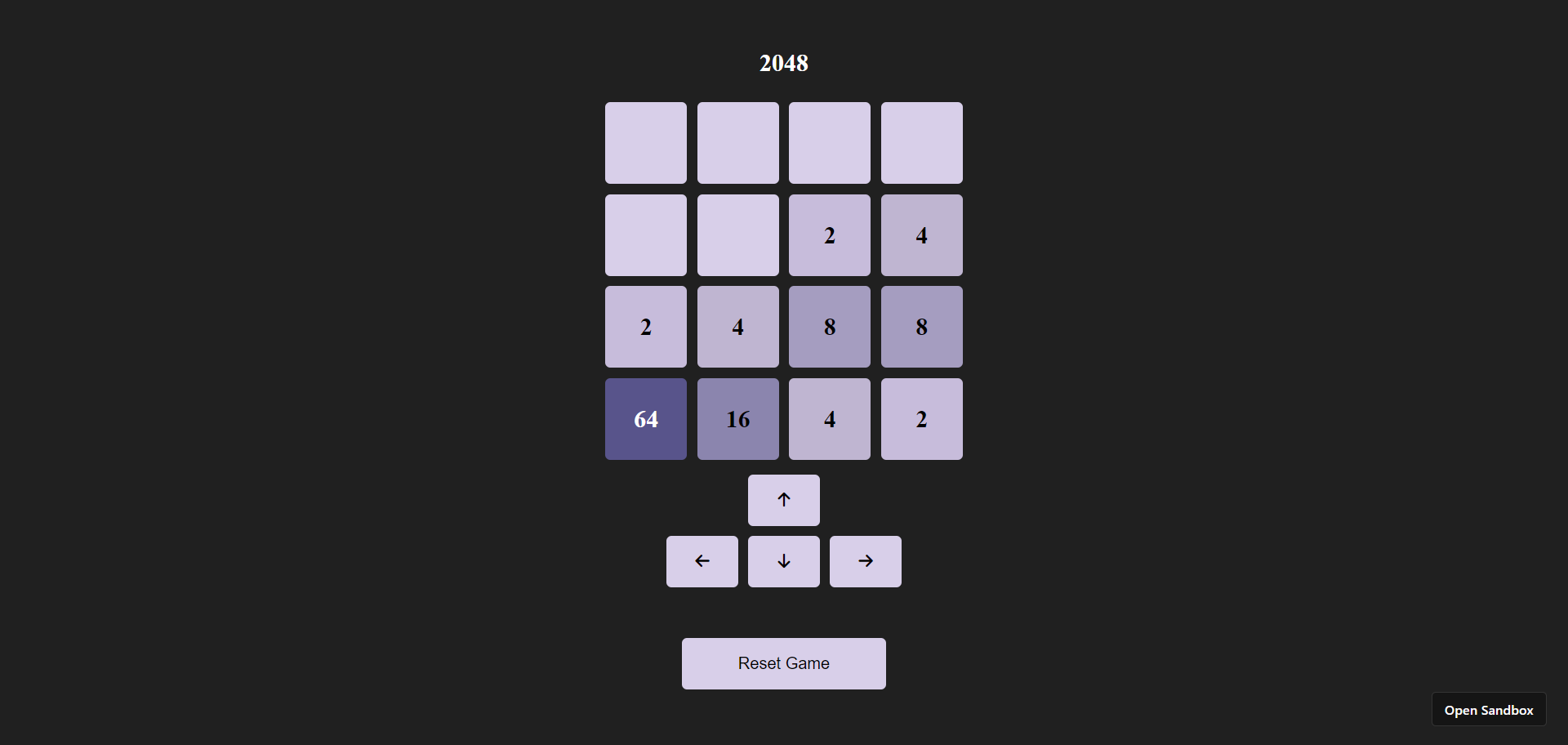
A user can play 2048 game on a browser.
Node Dependencies
- react
- react-dom
- react-scripts
How we built it
I've created it on codesandbox.io, using the react.js template. Firstly, import the fontawesome kit script in the /public/index.html as,
<script src="https://kit.fontawesome.com/6f42fc440c.js" crossorigin="anonymous" ></script>
In /src/App.js, create a empty 4x4 grid, and display on screen, along with arrow buttons, and start/reset button.
import React, { useState, useEffect } from "react";
import "./App.css";

function App() {
  const [grid, setGrid] = useState(createEmptyGrid());

  return (
    <div className="App">
      <h2>2048</h2>
      {grid.map((row, i) => (
        <div key={i} style={{ display: "flex" }}>
          {row.map((value, j) => (
            <div
              key={j}
              className="cell"
              data-value={value !== 0 ? value : null}
            >
              {value !== 0 ? value : ""}
            </div>
          ))}
        </div>
      ))}
      <div className="buttons">
        <div className="buttons-upper">
          <button onClick={moveUp}>
            <i class="fa-solid fa-arrow-up"></i>
          </button>
        </div>
        <div className="buttons-lower">
          <button onClick={moveLeft}>
            <i class="fa-solid fa-arrow-left"></i>
          </button>
          <button onClick={moveDown}>
            <i class="fa-solid fa-arrow-down"></i>
          </button>
          <button onClick={moveRight}>
            <i class="fa-solid fa-arrow-right"></i>
          </button>
        </div>
        {grid.flat().every((value) => value === 0) ? (
          <button className="start-btn" onClick={addNumber}>
            Start Game
          </button>
        ) : (
          <button className="reset-btn" onClick={resetGame}>
            Reset Game
          </button>
        )}
      </div>
    </div>
  );
}

export default App;
body {
  background-color: rgb(32, 32, 32);
}

.App {
  display: flex;
  flex-direction: column;
  align-items: center;
  padding: 20px;
}

h2 {
  color: white;
}

.cell {
  width: 80px;
  height: 80px;
  background-color: rgb(216, 207, 233);
  border-radius: 5px;
  display: flex;
  justify-content: center;
  align-items: center;
  font-size: 24px;
  font-weight: bold;
  margin: 5px;
}

.cell[data-value="2"] {
  background-color: rgb(199, 188, 219);
}

.cell[data-value="4"] {
  background-color: rgb(191, 181, 209);
}

.cell[data-value="8"] {
  background-color: rgb(165, 157, 192);
}

.cell[data-value="16"] {
  background-color: rgb(139, 133, 174);
}

.cell[data-value="32"] {
  background-color: rgb(114, 108, 156);
}

.cell[data-value^="64"] {
  color: rgb(255, 255, 255);
}

.cell[data-value="64"] {
  background-color: rgb(88, 84, 139);
}

.cell[data-value="128"] {
  background-color: rgb(62, 56, 121);
}

.cell[data-value="256"] {
  background-color: rgb(37, 32, 104);
}

.cell[data-value="512"] {
  background-color: rgb(25, 20, 80);
}

.cell[data-value="1024"] {
  background-color: rgb(13, 10, 56);
}

.cell[data-value="2048"] {
  background-color: rgb(3, 5, 33);
}

.buttons {
  display: flex;
  flex-direction: column;
  align-items: center;
}

.buttons-lower {
  display: flex;
  justify-content: center;
  align-items: center;
  gap: 10px;
}

button {
  margin-top: 10px;
  padding: 10px 20px;
  font-size: 16px;
  cursor: pointer;
  border: none;
  border-radius: 5px;
  background-color: rgb(216, 207, 233);
  width: 70px;
  height: 50px;
}

.reset-btn,
.start-btn {
  width: 200px;
  margin-top: 50px;
}
Create a function allot inital value as 0 to each cell of the grid
  function createEmptyGrid() {
    return Array(4)
      .fill()
      .map(() => Array(4).fill(0));
  }
Create addNumber which will fill a random empty spot in the grid with 2 or 4. This addNumber is called fron the start button as well as after each move.
function addNumber() {
    let newGrid = [...grid];
    let availableSpots = [];
    for (let i = 0; i < 4; i++) {
      for (let j = 0; j < 4; j++) {
        if (newGrid[i][j] === 0) {
          availableSpots.push({ x: i, y: j });
        }
      }
    }
    if (availableSpots.length > 0) {
      let randomSpot =
        availableSpots[Math.floor(Math.random() * availableSpots.length)];
      newGrid[randomSpot.x][randomSpot.y] = Math.random() > 0.5 ? 2 : 4;
      setGrid(newGrid);
    }
  }
Create moveUp, moveDown, moveRight, moveLeft functions to handle the movement of numbers within the grid according to the rules of the 2048 game. They iterate through each cell of the grid, checking for non-empty cells and shifting them in the specified direction. If adjacent cells have the same value, they merge into one cell with a doubled value. After each move, a new number is added to the grid using the addNumber function. Finally, the updated grid state is saved.
  function moveUp() {
    let newGrid = [...grid];
    let moved = false;
    for (let j = 0; j < 4; j++) {
      for (let i = 1; i < 4; i++) {
        if (newGrid[i][j] !== 0) {
          let k = i;
          while (k > 0 && newGrid[k - 1][j] === 0) {
            newGrid[k - 1][j] = newGrid[k][j];
            newGrid[k][j] = 0;
            k--;
            moved = true;
          }
          if (k > 0 && newGrid[k - 1][j] === newGrid[k][j]) {
            newGrid[k - 1][j] *= 2;
            newGrid[k][j] = 0;
            moved = true;
          }
        }
      }
    }
    if (moved) {
      addNumber();
    }
    setGrid(newGrid);
  }

  function moveDown() {
    let newGrid = [...grid];
    let moved = false;
    for (let j = 0; j < 4; j++) {
      for (let i = 2; i >= 0; i--) {
        if (newGrid[i][j] !== 0) {
          let k = i;
          while (k < 3 && newGrid[k + 1][j] === 0) {
            newGrid[k + 1][j] = newGrid[k][j];
            newGrid[k][j] = 0;
            k++;
            moved = true;
          }
          if (k < 3 && newGrid[k + 1][j] === newGrid[k][j]) {
            newGrid[k + 1][j] *= 2;
            newGrid[k][j] = 0;
            moved = true;
          }
        }
      }
    }
    if (moved) {
      addNumber();
    }
    setGrid(newGrid);
  }

  function moveRight() {
    let newGrid = [...grid];
    let moved = false;
    for (let i = 0; i < 4; i++) {
      for (let j = 2; j >= 0; j--) {
        if (newGrid[i][j] !== 0) {
          let k = j;
          while (k < 3 && newGrid[i][k + 1] === 0) {
            newGrid[i][k + 1] = newGrid[i][k];
            newGrid[i][k] = 0;
            k++;
            moved = true;
          }
          if (k < 3 && newGrid[i][k + 1] === newGrid[i][k]) {
            newGrid[i][k + 1] *= 2;
            newGrid[i][k] = 0;
            moved = true;
          }
        }
      }
    }
    if (moved) {
      addNumber();
    }
    setGrid(newGrid);
  }

  function moveLeft() {
    let newGrid = [...grid];
    let moved = false;
    for (let i = 0; i < 4; i++) {
      for (let j = 1; j < 4; j++) {
        if (newGrid[i][j] !== 0) {
          let k = j;
          while (k > 0 && newGrid[i][k - 1] === 0) {
            newGrid[i][k - 1] = newGrid[i][k];
            newGrid[i][k] = 0;
            k--;
            moved = true;
          }
          if (k > 0 && newGrid[i][k - 1] === newGrid[i][k]) {
            newGrid[i][k - 1] *= 2;
            newGrid[i][k] = 0;
            moved = true;
          }
        }
      }
    }
    if (moved) {
      addNumber();
    }
    setGrid(newGrid);
  }
Create two state variables, gameOver and gameWon, initialized as false. Whenever the grid state changes call the checkGameOver function. The checkGameOver function iterates through the grid to assess potential moves and the presence of empty cells. If there are no available moves and no empty cells, the set gameOver as true. Additionally, if the grid contains the value 2048, indicating the player has reached the winning condition, gameWon as true.
    const [gameOver, setGameOver] = useState(false);
    const [gameWon, setGameWon] = useState(false);
    useEffect(() => {
        checkGameOver();
    }, [grid]);

    function checkGameOver() {
    let emptyCells = grid.flat().filter((value) => value === 0).length;
    let possibleMoves = false;

    for (let i = 0; i < 4; i++) {
      for (let j = 0; j < 4; j++) {
        if (i > 0 && grid[i][j] === grid[i - 1][j]) {
          possibleMoves = true;
        }
        if (i < 3 && grid[i][j] === grid[i + 1][j]) {
          possibleMoves = true;
        }
        if (j > 0 && grid[i][j] === grid[i][j - 1]) {
          possibleMoves = true;
        }
        if (j < 3 && grid[i][j] === grid[i][j + 1]) {
          possibleMoves = true;
        }
      }
    }

    if (emptyCells === 0 && !possibleMoves) {
      setGameOver(true);
    }
    if (grid.flat().includes(2048)) {
      setGameWon(true);
    }
  }
Display the game over or win status
      {gameOver && <div className="message">Game Over!</div>}
      {gameWon && <div className="message">You Win!</div>}
.message {
  font-size: 20px;
  font-style: italic;
  font-weight: bold;
  margin-bottom: 20px;
  color: white;
}
Full Code:
// App.js
import React, { useState, useEffect } from "react";
import "./styles.css";

function App() {
  const [grid, setGrid] = useState(createEmptyGrid());
  const [gameOver, setGameOver] = useState(false);
  const [gameWon, setGameWon] = useState(false);

  function createEmptyGrid() {
    return Array(4)
      .fill()
      .map(() => Array(4).fill(0));
  }

  useEffect(() => {
    checkGameOver();
  }, [grid]);

  function addNumber() {
    let newGrid = [...grid];
    let availableSpots = [];
    for (let i = 0; i < 4; i++) {
      for (let j = 0; j < 4; j++) {
        if (newGrid[i][j] === 0) {
          availableSpots.push({ x: i, y: j });
        }
      }
    }
    if (availableSpots.length > 0) {
      let randomSpot =
        availableSpots[Math.floor(Math.random() * availableSpots.length)];
      newGrid[randomSpot.x][randomSpot.y] = Math.random() > 0.5 ? 2 : 4;
      setGrid(newGrid);
    }
  }

  function moveUp() {
    let newGrid = [...grid];
    let moved = false;
    for (let j = 0; j < 4; j++) {
      for (let i = 1; i < 4; i++) {
        if (newGrid[i][j] !== 0) {
          let k = i;
          while (k > 0 && newGrid[k - 1][j] === 0) {
            newGrid[k - 1][j] = newGrid[k][j];
            newGrid[k][j] = 0;
            k--;
            moved = true;
          }
          if (k > 0 && newGrid[k - 1][j] === newGrid[k][j]) {
            newGrid[k - 1][j] *= 2;
            newGrid[k][j] = 0;
            moved = true;
          }
        }
      }
    }
    if (moved) {
      addNumber();
    }
    setGrid(newGrid);
  }

  function moveDown() {
    let newGrid = [...grid];
    let moved = false;
    for (let j = 0; j < 4; j++) {
      for (let i = 2; i >= 0; i--) {
        if (newGrid[i][j] !== 0) {
          let k = i;
          while (k < 3 && newGrid[k + 1][j] === 0) {
            newGrid[k + 1][j] = newGrid[k][j];
            newGrid[k][j] = 0;
            k++;
            moved = true;
          }
          if (k < 3 && newGrid[k + 1][j] === newGrid[k][j]) {
            newGrid[k + 1][j] *= 2;
            newGrid[k][j] = 0;
            moved = true;
          }
        }
      }
    }
    if (moved) {
      addNumber();
    }
    setGrid(newGrid);
  }

  function moveRight() {
    let newGrid = [...grid];
    let moved = false;
    for (let i = 0; i < 4; i++) {
      for (let j = 2; j >= 0; j--) {
        if (newGrid[i][j] !== 0) {
          let k = j;
          while (k < 3 && newGrid[i][k + 1] === 0) {
            newGrid[i][k + 1] = newGrid[i][k];
            newGrid[i][k] = 0;
            k++;
            moved = true;
          }
          if (k < 3 && newGrid[i][k + 1] === newGrid[i][k]) {
            newGrid[i][k + 1] *= 2;
            newGrid[i][k] = 0;
            moved = true;
          }
        }
      }
    }
    if (moved) {
      addNumber();
    }
    setGrid(newGrid);
  }

  function moveLeft() {
    let newGrid = [...grid];
    let moved = false;
    for (let i = 0; i < 4; i++) {
      for (let j = 1; j < 4; j++) {
        if (newGrid[i][j] !== 0) {
          let k = j;
          while (k > 0 && newGrid[i][k - 1] === 0) {
            newGrid[i][k - 1] = newGrid[i][k];
            newGrid[i][k] = 0;
            k--;
            moved = true;
          }
          if (k > 0 && newGrid[i][k - 1] === newGrid[i][k]) {
            newGrid[i][k - 1] *= 2;
            newGrid[i][k] = 0;
            moved = true;
          }
        }
      }
    }
    if (moved) {
      addNumber();
    }
    setGrid(newGrid);
  }

  function checkGameOver() {
    let emptyCells = grid.flat().filter((value) => value === 0).length;
    let possibleMoves = false;

    for (let i = 0; i < 4; i++) {
      for (let j = 0; j < 4; j++) {
        if (i > 0 && grid[i][j] === grid[i - 1][j]) {
          possibleMoves = true;
        }
        if (i < 3 && grid[i][j] === grid[i + 1][j]) {
          possibleMoves = true;
        }
        if (j > 0 && grid[i][j] === grid[i][j - 1]) {
          possibleMoves = true;
        }
        if (j < 3 && grid[i][j] === grid[i][j + 1]) {
          possibleMoves = true;
        }
      }
    }

    if (emptyCells === 0 && !possibleMoves) {
      setGameOver(true);
    }
    if (grid.flat().includes(2048)) {
      setGameWon(true);
    }
  }

  function resetGame() {
    setGrid(createEmptyGrid());
    setGameOver(false);
    setGameWon(false);
  }

  return (
    <div className="App">
      <h2>2048</h2>
      {gameOver && <div className="message">Game Over!</div>}
      {gameWon && <div className="message">You Win!</div>}
      {grid.map((row, i) => (
        <div key={i} style={{ display: "flex" }}>
          {row.map((value, j) => (
            <div
              key={j}
              className="cell"
              data-value={value !== 0 ? value : null}
            >
              {value !== 0 ? value : ""}
            </div>
          ))}
        </div>
      ))}
      <div className="buttons">
        <div className="buttons-upper">
          <button onClick={moveUp}>
            <i class="fa-solid fa-arrow-up"></i>
          </button>
        </div>
        <div className="buttons-lower">
          <button onClick={moveLeft}>
            <i class="fa-solid fa-arrow-left"></i>
          </button>
          <button onClick={moveDown}>
            <i class="fa-solid fa-arrow-down"></i>
          </button>
          <button onClick={moveRight}>
            <i class="fa-solid fa-arrow-right"></i>
          </button>
        </div>
        {grid.flat().every((value) => value === 0) ? (
          <button className="start-btn" onClick={addNumber}>
            Start Game
          </button>
        ) : (
          <button className="reset-btn" onClick={resetGame}>
            Reset Game
          </button>
        )}
      </div>
    </div>
  );
}

export default App;
/* styles.css */
body {
  background-color: rgb(32, 32, 32);
}

.App {
  display: flex;
  flex-direction: column;
  align-items: center;
  padding: 20px;
}

h2 {
  color: white;
}

.cell {
  width: 80px;
  height: 80px;
  background-color: rgb(216, 207, 233);
  border-radius: 5px;
  display: flex;
  justify-content: center;
  align-items: center;
  font-size: 24px;
  font-weight: bold;
  margin: 5px;
}

.cell[data-value="2"] {
  background-color: rgb(199, 188, 219);
}

.cell[data-value="4"] {
  background-color: rgb(191, 181, 209);
}

.cell[data-value="8"] {
  background-color: rgb(165, 157, 192);
}

.cell[data-value="16"] {
  background-color: rgb(139, 133, 174);
}

.cell[data-value="32"] {
  background-color: rgb(114, 108, 156);
}

.cell[data-value^="64"] {
  color: rgb(255, 255, 255);
}

.cell[data-value="64"] {
  background-color: rgb(88, 84, 139);
}

.cell[data-value="128"] {
  background-color: rgb(62, 56, 121);
}

.cell[data-value="256"] {
  background-color: rgb(37, 32, 104);
}

.cell[data-value="512"] {
  background-color: rgb(25, 20, 80);
}

.cell[data-value="1024"] {
  background-color: rgb(13, 10, 56);
}

.cell[data-value="2048"] {
  background-color: rgb(3, 5, 33);
}

.buttons {
  display: flex;
  flex-direction: column;
  align-items: center;
}

.buttons-lower {
  display: flex;
  justify-content: center;
  align-items: center;
  gap: 10px;
}

button {
  margin-top: 10px;
  padding: 10px 20px;
  font-size: 16px;
  cursor: pointer;
  border: none;
  border-radius: 5px;
  background-color: rgb(216, 207, 233);
  width: 70px;
  height: 50px;
}

.message {
  font-size: 20px;
  font-style: italic;
  font-weight: bold;
  margin-bottom: 20px;
  color: white;
}

.reset-btn,
.start-btn {
  width: 200px;
  margin-top: 50px;
}
including the remaining react files such as /public/index.html, /src/index.js, and package.json.
Challenges we ran into
Formulating a logic for movements and merging.

Log in or sign up for Devpost to join the conversation.