Inspiration
People are frustrated with the "all or nothing" approach of most AI image tools, as they can write a prompt to change only the entire photo, but what if they just want to fix one small part? "Imagenator" (Image + Imagination) was born from a simple idea: What if people could just select an area of the photo and tell the AI what to put there? We wanted to build a tool for creators that combines the precision of a selection tool with the infinite creativity of generative AI.
What it does
Imagenator is an iOS app backed by a powerful serverless backend that gives you pinpoint control over AI-powered photo editing.
Upload: A user uploads their photo to the app. Our backend stores this as the "original."
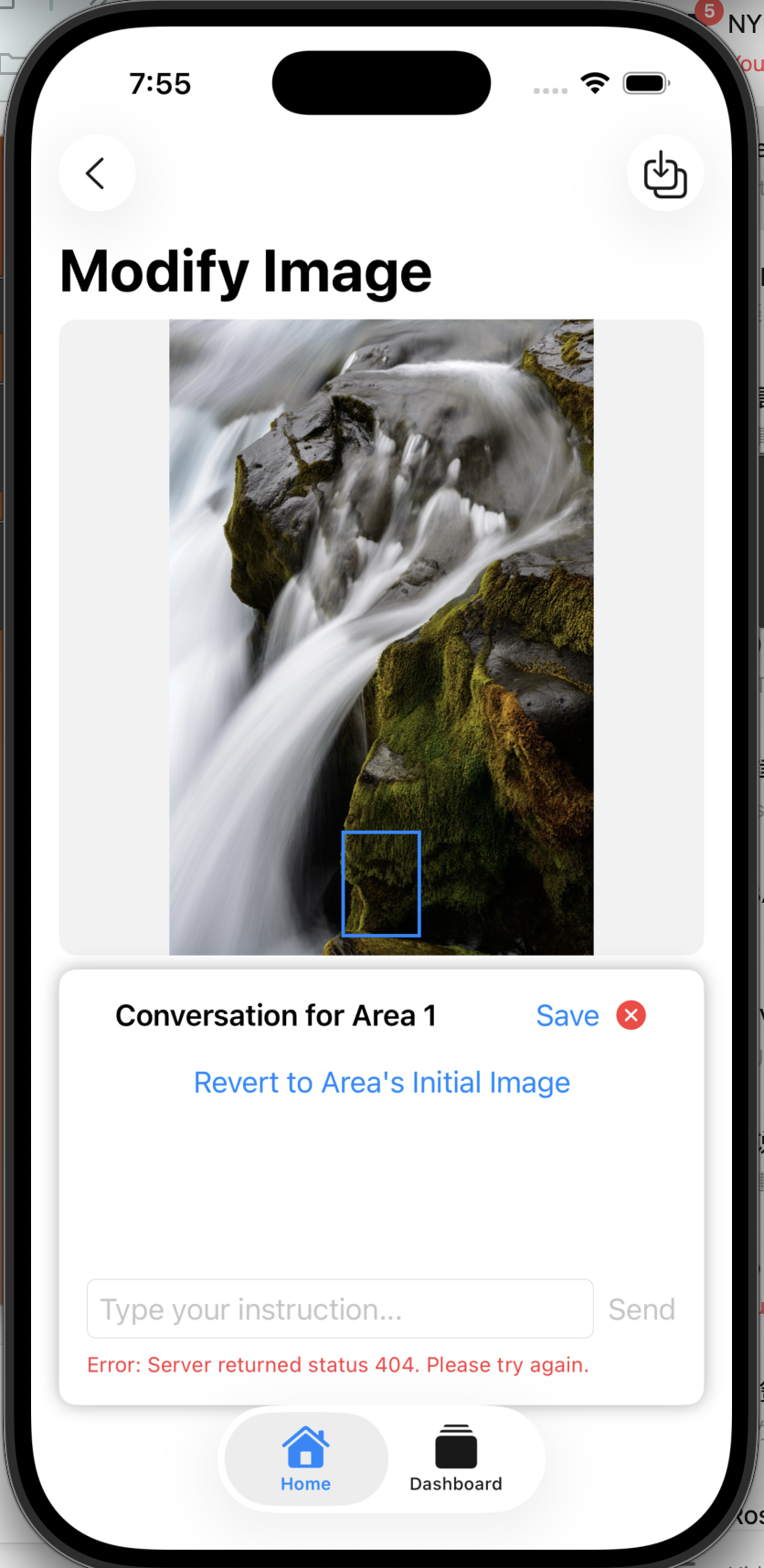
Select & Edit: The user draws a box around any part of the image and types an instruction (e.g., "add a flower").
Process: The app sends this instruction, the image ID, and a mask of the selected area to our API. The backend then edits only the masked area, leaving the rest of the photo untouched.
History & Rollback: Every edit is saved as a new "step" in an S3 manifest file. This creates a non-destructive edit history, like "Git for images," allowing a user to roll back to any previous version.
The backend is built to be robust, supporting both synchronous (for fast, real-time edits) and asynchronous (for heavy jobs) request flows, so the user never has to stare at a loading spinner.
How we built it 🛠️
The entire system is a full-stack, serverless architecture hosted on AWS:
iOS App (Frontend): A native iOS app built in Swift with SwiftUI. It handles user login, photo selection (using DragGesture to create a CGRect), and communication with our backend.
Authentication: AWS Cognito handles all user sign-up, login, and provides the JWTs we use to authorize every API request.
API Layer: Amazon API Gateway provides the secure HTTP endpoints (/upload, /images/edit, /images/rollback) for the app.
Core Logic (Serverless): We use two AWS Lambda functions (written in Python):
lambda_main.py: The entry point for all API calls. It handles fast tasks like uploads, validating requests, and enqueueing jobs.
lambda_worker.py: A dedicated worker that processes long-running AI edit jobs from an SQS queue.
Async Job Queue: Amazon SQS (a FIFO queue) separates the "request" from the "work." When a user submits a complex edit, the main Lambda adds a message to the queue and instantly returns a 202 "Accepted" response to the app.
AI Generation: Amazon Bedrock is our AI engine. We use the Titan Image Generator model for the in-painting and editing.
Storage & State: Amazon S3 is our single source of truth. It stores all artifacts:
The original uploaded images.
User-generated masks.
Every generated edit (e.g., step-0001.png, step-0002.png).
A manifest.json file for each image, which tracks the entire edit history, instructions, and which "step" is the current one.
Challenges we ran into
State Management: Lambda is stateless. Our biggest challenge was designing a robust system to track an image's state (its history, its current version). We solved this by creating the manifest.json file in S3, which acts as a "commit log" for every edit.
API Timeouts vs. AI Speed: AI image generation can be slow, but API Gateway has a 30-second timeout. We couldn't let a user's app time out. We solved this by implementing a dual-mode API: simple requests run synchronously, while complex jobs (with the async: true flag) are sent to an SQS queue, allowing our lambda_worker to process them in the background.
Masking & Coordinates: The user draws a box on their scaled-down image in the app, but the AI needs to edit the full-resolution original file. We had to write functions to precisely convert the on-screen CGRect coordinates to the correct pixel coordinates of the original image, create a black-and-white mask Data from those coordinates, and send that mask to Bedrock.
Accomplishments that we're proud of The Non-Destructive History: We are incredibly proud of the manifest.json system. It's truly "Git for images." Users can experiment with wild ideas, and if they don't like an edit, they can roll back to any previous step with a single API call (/images/rollback).
A Robust Async Pipeline: The SQS-to-Lambda worker pattern is a professional, scalable solution. It ensures that even if thousands of users submit edits at once, the system won't crash. Jobs are processed reliably in the order they were received.
True In-Painting Precision: We successfully implemented high-precision editing. Our backend correctly handles masks to ensure the AI only touches the pixels the user selected, which is a huge step up from "add a sticker" apps.
What we learned
Serverless is Perfect for AI: For "bursty" workloads like AI editing (high load for 30 seconds, then idle), a serverless architecture (API Gateway + Lambda + SQS) is far more scalable and cost-effective than a traditional server.
A Manifest is a Powerful Tool: Using a JSON file in S3 as a "source of truth" for state is a powerful pattern that solves many stateless architecture problems.
What's next for Imagenator
AI-Powered instructions: we'll add API to help user better enhance the prompt, becoming more clear of what to expect in a shorter time.
Social media analysis: we'll add functions to help user post on instagrams/facebooks/tiktoks etc with relative filtering and prompt templates. Those functions will help the image posted better fit in the atomsphere. Giving them instructions of making the post more possibily attracting more likes.

Log in or sign up for Devpost to join the conversation.