-
-
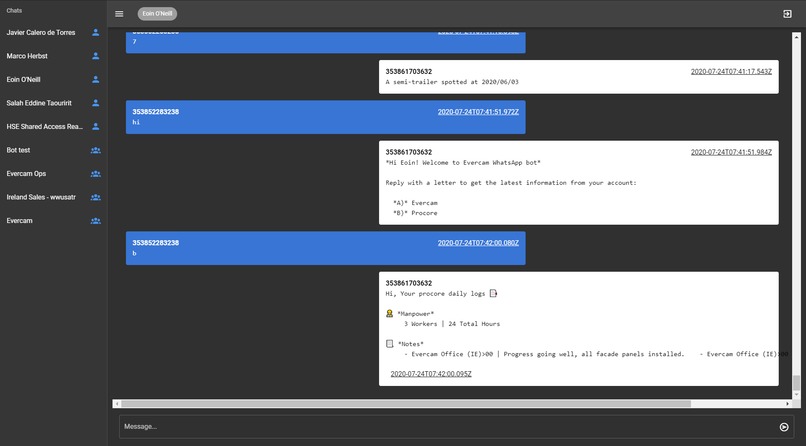
Whatsapp Bot Frontend
-
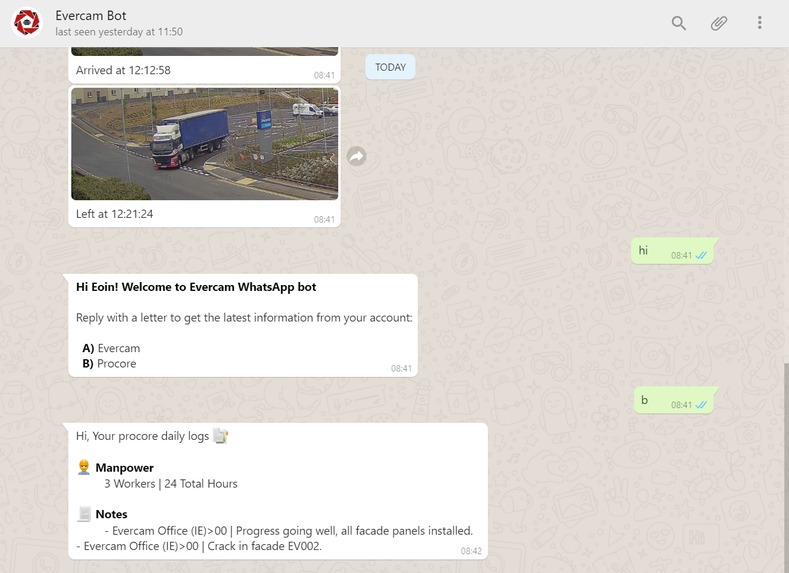
Whatsapp Bot User End
Inspiration
'I got into construction so I wouldn't have to use a computer or stupid apps' - this was said to me a few years ago when running a training session for a Site Diary app and it stuck with me. With so much technology being introduced to support the completion of a project sometimes the question of necessity is overlooked. We need the most important information at our fingertips with the smallest amount of effort. This is what inspired W.E.B. (Whatsapp Evercam Bot), a simple to use bot that you can send a couple of texts to and get back clear concise information or visual snapshot.
To simplify communication on-site by using live images and reports.
What it does
W.E.B. connects to your Evercam account and Whatsapp to give you a live snapshot of your project at the touch of a button. There are two main elements that can be captured through communication, Camera Live View and Gate Reports
How we built it
We built our W.E.B bot around WhatsApp capabilities using a headless browser, the backend stars a puppeteer instance in the background asking for QR authentication. After the authentication, the bot will be ready to receive the user’s messages.
The bot will use the user phone number to authenticate to the Evercam API, once the communication is well established, the bot will be able to answer the user’s questions.
The bot backend sends HTTP requests to get user’s responses following a well-defined flow.
Challenges we ran into
Keeping the chatbot connected (for that, we are storing the headless browser session in an S3 bucket). Integrating with Procore, this was mostly down to our own back end issues which we couldn't resolve in time to get a live demo of the integration
Accomplishments that we're proud of
Successfully proving that we can use WhatsApp chatbots (or any similar service) as a construction API client.
What we learned
Designing a chatbot communication flow can be tricky.
What's next for W.E.B, Whatsapp Evercam Bot
Improved functionality and integrations with Procore and Autodesk. We aim to build this further and make it a seamless part of the site teams day toolbox. Now that we've managed to keep the chatbot running its only a matter of time before we start pulling more information into one place.


Log in or sign up for Devpost to join the conversation.