-
-
-
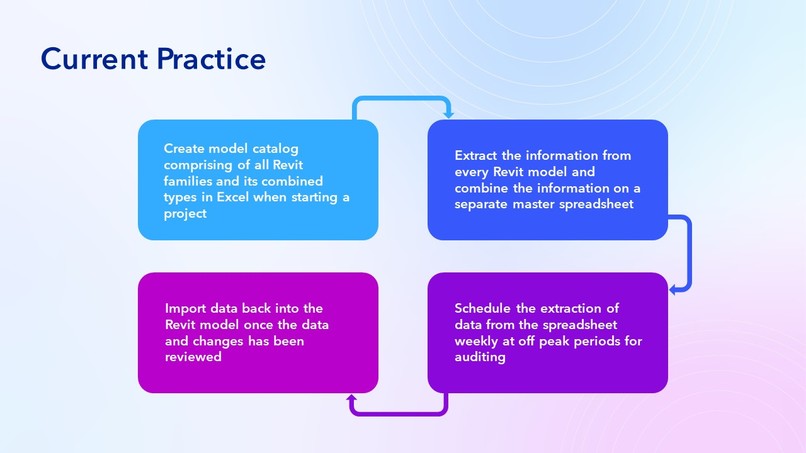
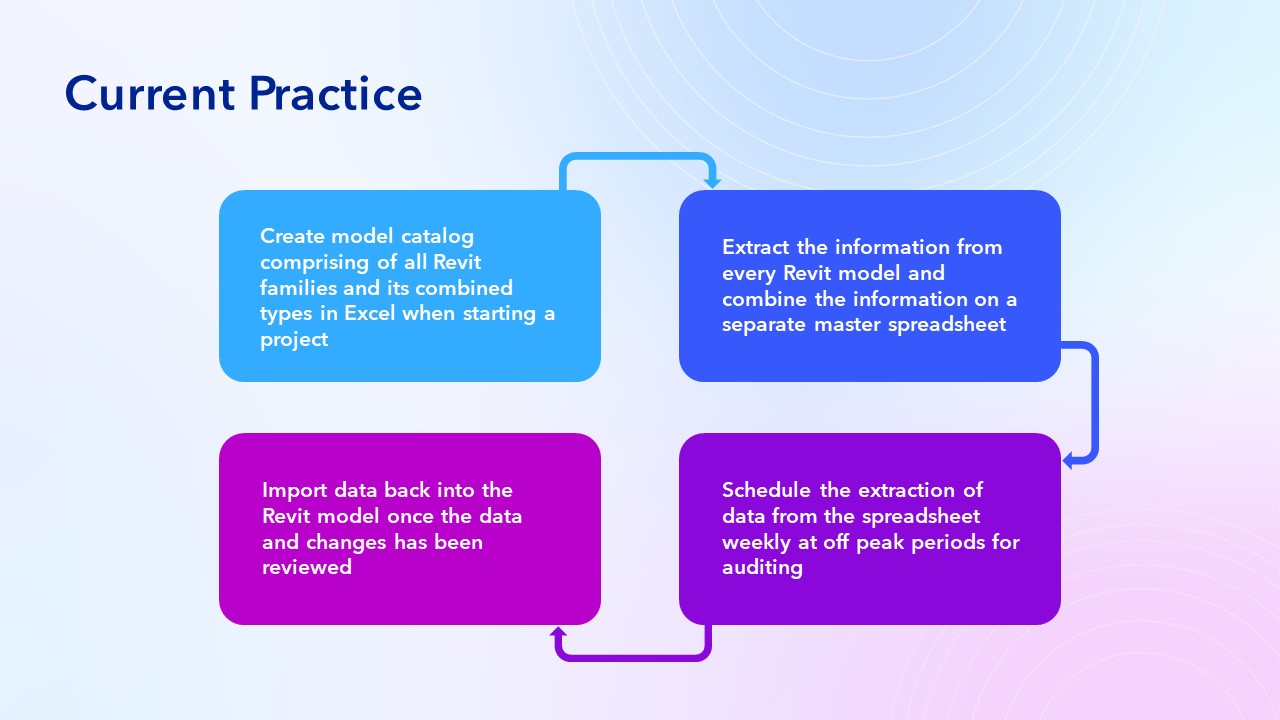
Current Practice
-
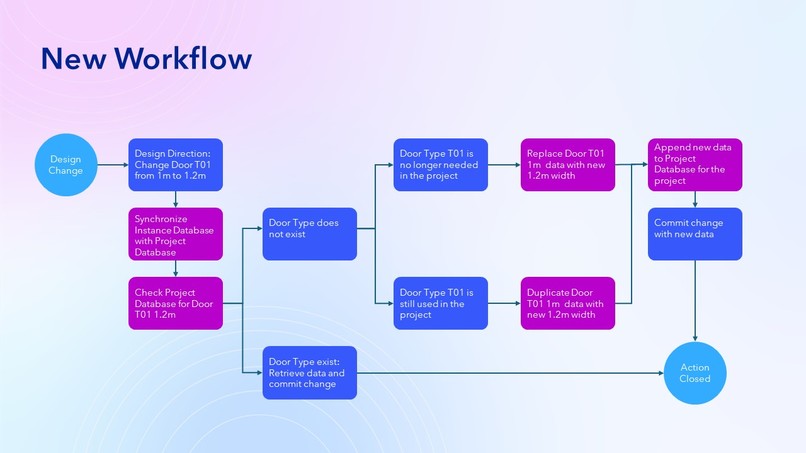
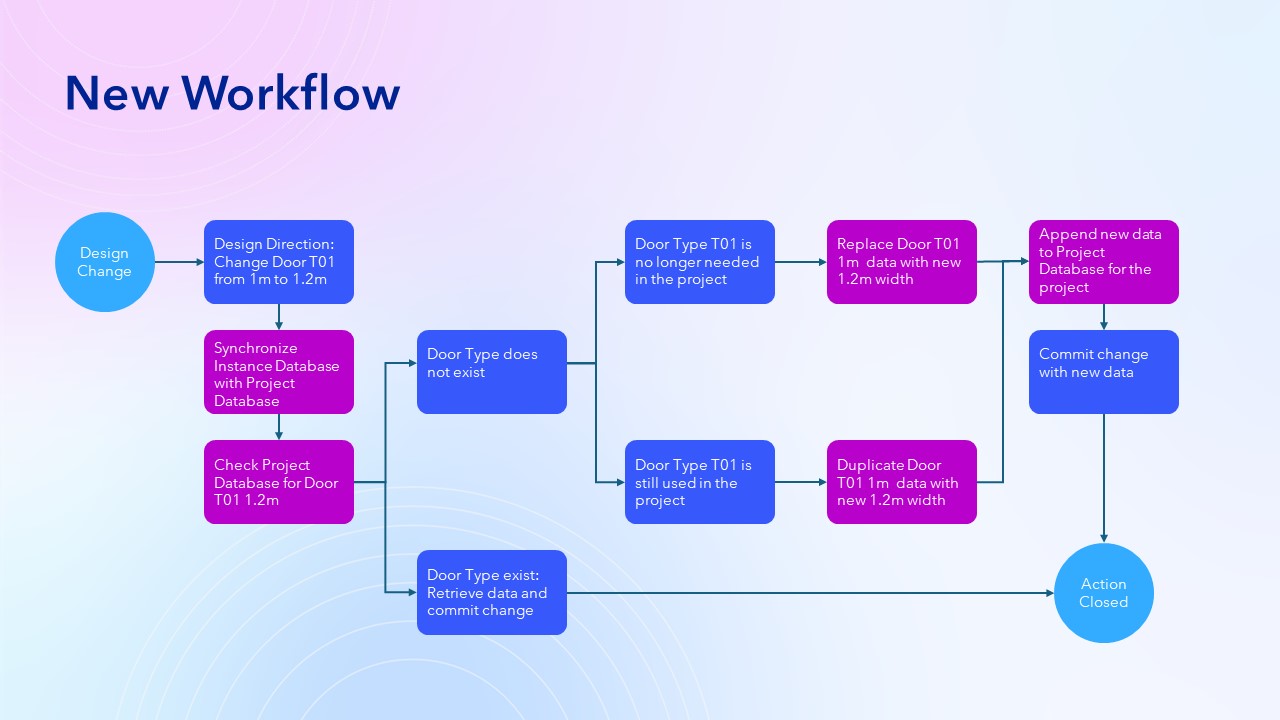
Proposed New Workflow
-
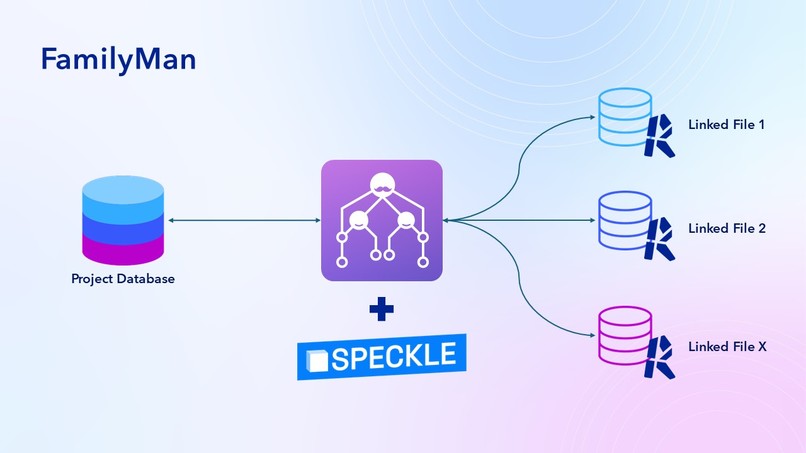
FamilyMan
-
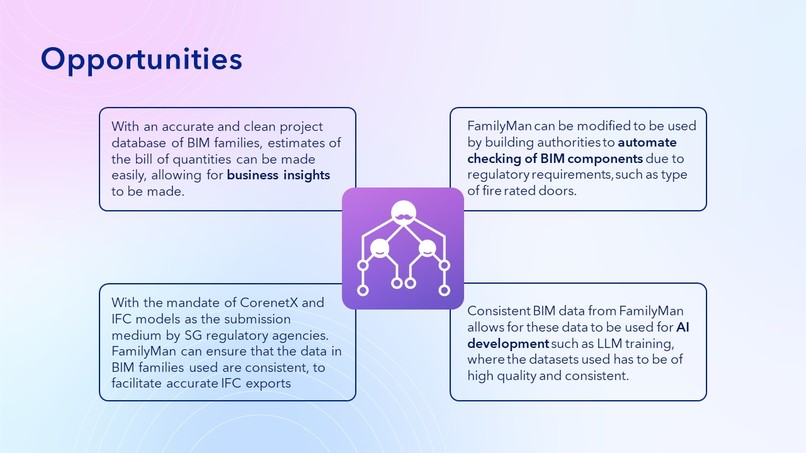
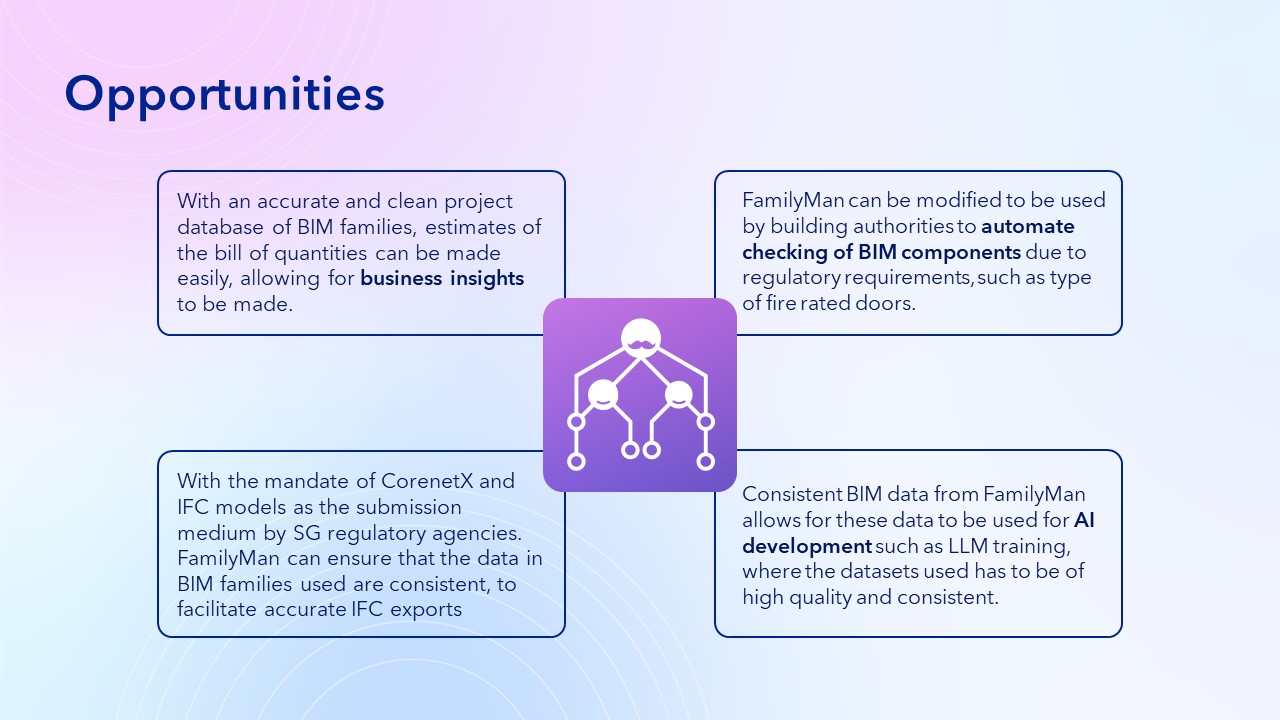
Possible Opportunities
FamilyMan: Keeping your BIM Family in line
Inspiration
FamilyMan was developed to address the confusion and complexity in managing BIM data, caused by multiple stakeholders and inconsistent model content. By integrating various plugin solutions, FamilyMan simplifies data management, streamlining workflows and reducing mental effort for project stakeholders. This integration eliminates the need to switch between tools, making data handling more efficient and less error-prone, saving time and labor for the BIM team.
”Inconsistencies of the model content has been plaguing our team consistently. To allow synchronization across the board by itself will save us a lot of time. -Jason Lee”
”One of the challenges in BIM project management, lies in ensuring consistent properties and data, across models and their contained component types from different sources (i.e. stakeholders, modeling applications, etc...) Being able to normalize that efficiently would go a long way in maintaining data integrity, reducing errors, and enhancing overall project efficiency and effectiveness. -Evangelina Ong”
“Inconsistencies in model content significantly hinder progress and efficiency. Ensuring uniformity in properties and data across models, sourced from various stakeholders and applications, is crucial. Beyond streamlining workflows, it also helps foster collaboration and trust among stakeholders. Clear protocols for data normalization not only enhance efficiency but also cultivate reliability and coherence, essential for successful project outcomes. -Tiffany Tay”
What it does
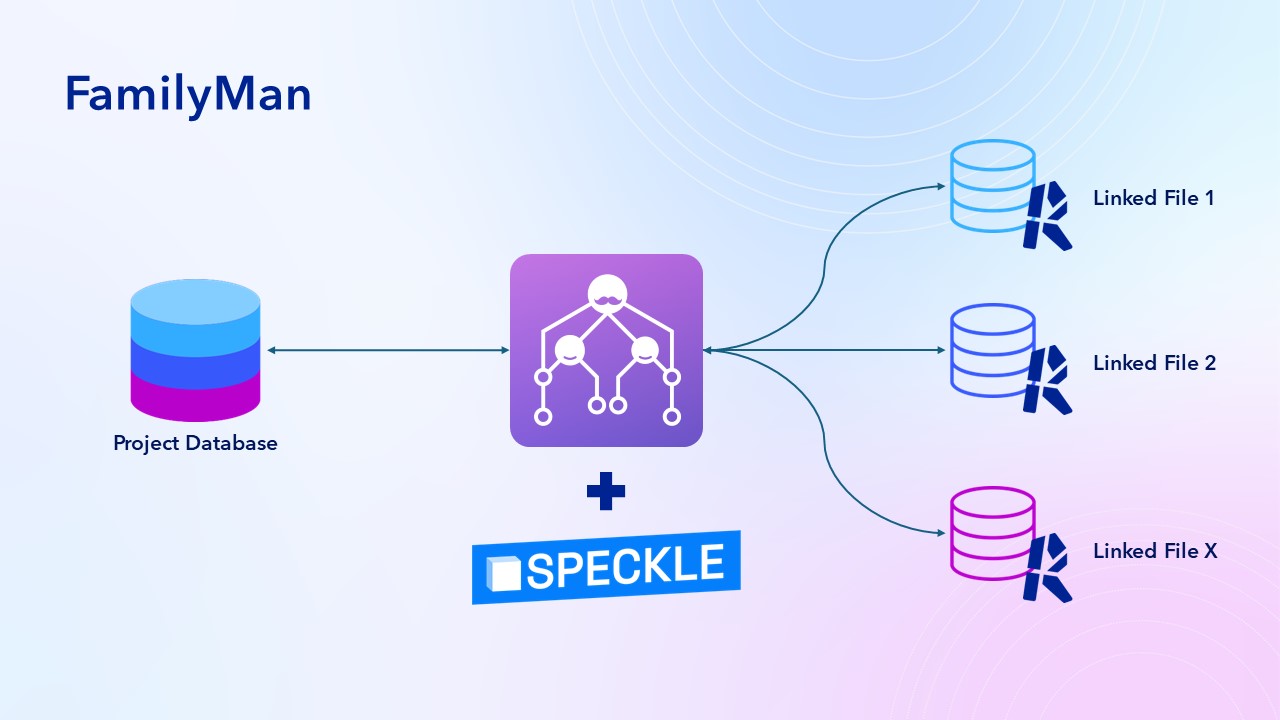
FamilyMan creates a central Project Database linked to Instance Databases for each Revit model, enabling a controlled flow of information. It features:
1. Data Gateway Control:
- Preventing Data Fragmentation: The data gateway ensures that users cannot create new family types without verifying existing ones, thus preventing unnecessary data duplication.
- Seamless Synchronization: FamilyMan synchronizes the Instance Database with the Project Database, checking for existing family types and allowing users to make changes that affect either the individual model or the entire project.
- Automated Decision-Making: This feature automates data control, eliminating bottlenecks typically caused by waiting for BIM manager reviews. A backdoor review process is included for auditing purposes.
2. Infovisual Presentation:
- Intuitive Dashboard: The dashboard provides BIM managers with easy access to the Project Database and update logs. A 3D model viewer is integrated, highlighting corresponding objects when data points are selected. - Immediate Analysis: This visual format facilitates quick analysis of the BIM health status, helping BIM managers promptly identify and address issues.
The multi-directional link and new structured data update process are designed to maintain data integrity, improve efficiency, and ensure that updates at any point of the system is accurately reflected.
How we built it
Development of FamilyMan is broken into four main parts
1. Creating a Testing Environment:
- A Revit model with suitable complexity is created, along with two linked files to reduce development challenges.
- Revit Families are named and classified to meet FamilyMan's requirements, primarily using Revit and Dynamo.
2. API Development for Data Management:
- The Project Database is hosted on a local server, with Speckle used to pull Instance Database data from Revit project files
- An API connects the Instance and Project Databases via Speckle, developed in Visual Studio Code using Speckle API and JavaScript.
3. Request System for Design Changes::
- A Revit API-based interface allows users to quickly filter and select family updates.
- Change requests are sent to a FastAPI server, which updates the corresponding Speckle object with the new parameters.
- The updated data is pushed into a new Speckle commit, which, when consumed via the BIM dashboard, updates the model parameters.
4. Dashboard for Auditing:
- Based on BIM manager requirements, the dashboard features a data table with properties, audit, and change log tabs.
- A 3D model viewer highlights geometry corresponding to selected BIM Family data, developed using Visual Studio Code, Speckle API, and JavaScript.
Challenges we ran into
Addressing the challenges you've encountered requires a multi-faceted approach to ensure both usability and functionality. Here are some strategies to tackle each issue:
1. Suitable UI for Database Report and Analysis:
- Creating an intuitive and user-friendly UI for database reporting and analysis poses a significant challenge. This complexity arises primarily because each BIM Family comprises an extensive number of data points, making it difficult to display all relevant information on a single dashboard without overwhelming the user.
2. Pairing the Database with a Model Viewer:
- Finding a model viewer that integrates well with the database while maintaining UI aesthetics.
3. Determining Editable vs. Non-Editable Data:
- Identifying which data parameters are editable and which are not.
4. Issues with Speckle Object Synchronization:
- Review the data mapping and synchronization processes between the database, Speckle object, and Revit model. Ensure that all relevant data is properly mapped and synchronized between systems.
5. Instantiating Change in Database onto Revit Family Component:
- Even though changes in the Project Database are captured in the Speckle objects, when pulled back into the Revit file, the affected Revit Family Component’s parameters still stay unchanged.
Accomplishments that we're proud of
We are proud of FamilyMan’s robust ability to facilitate bi-directional transactions, ensuring seamless synchronization of data across various models. This capability allows us to maintain data consistency and accuracy, significantly reducing the risk of errors and discrepancies. The system's automatic syncing mechanism streamlines workflows and enhances efficiency, providing a reliable foundation for our data management processes. Additionally, our dashboard has been meticulously designed to present data in a clear and readable format, aligned perfectly with our visualization goals. Its user-friendly interface and interactive features enable immediate analysis and auditing, empowering users to make informed decisions quickly. This combination of advanced data synchronization and an intuitive dashboard interface represents a significant achievement in our commitment to delivering efficient and effective data management solutions.
What we learned
A key lesson learned from our experience is the importance of consistency in the approach to extracting information from the database. We realized that to effectively utilize data for analysis and decision-making, it's crucial to extract the raw information and the full database from the source without omitting any details. This comprehensive approach ensures that all relevant data is available for analysis, preventing potential gaps or oversights in the insights derived from the data. Additionally, we learned that how we store and manage this information is critical for facilitating ease of parameter selection on the dashboard, akin to a Business Intelligence (BI) analytics platform. By organizing and structuring the data in a way that allows for seamless selection and analysis, we can enhance the usability and effectiveness of our data-driven decision-making processes.
What's next for FamilyMan
The next phase for FamilyMan involves a focus on enhancing its capabilities in information extraction, storage, and management. It's crucial to optimize the synchronization process and streamline traffic handling to ensure swift access and responsiveness for users. By efficiently managing this information pool, FamilyMan aims to leverage machine learning algorithms like LLM (Large Language Models) to analyze patterns and behaviors within the data. This analysis will pave the way for predictive insights, offering a glimpse into potential future database structures and content. Furthermore, these advancements will empower users with deeper insights and facilitate more informed decision-making processes. In the long term, while our current testing focuses on the Project Level Database, our ultimate aim is to extend this extraction process to encompass a broader spectrum of project sources, thus realizing it on a global scale.
Built With
- fastapi
- javascript
- local-server
- revit
- revitapi
- speckle
- speckleapi
- visual-studio


Log in or sign up for Devpost to join the conversation.