-
-
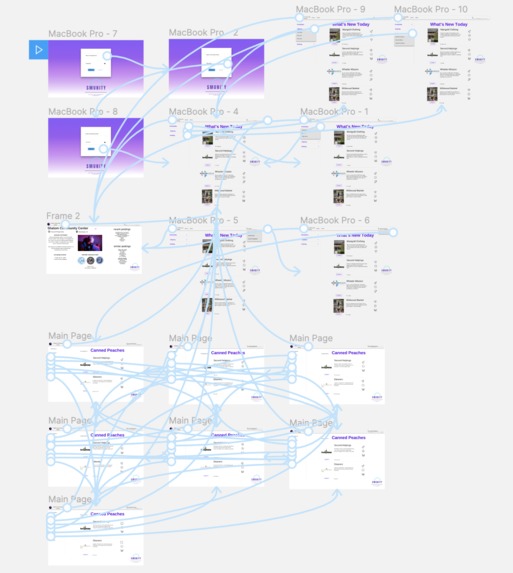
Website mapping
-
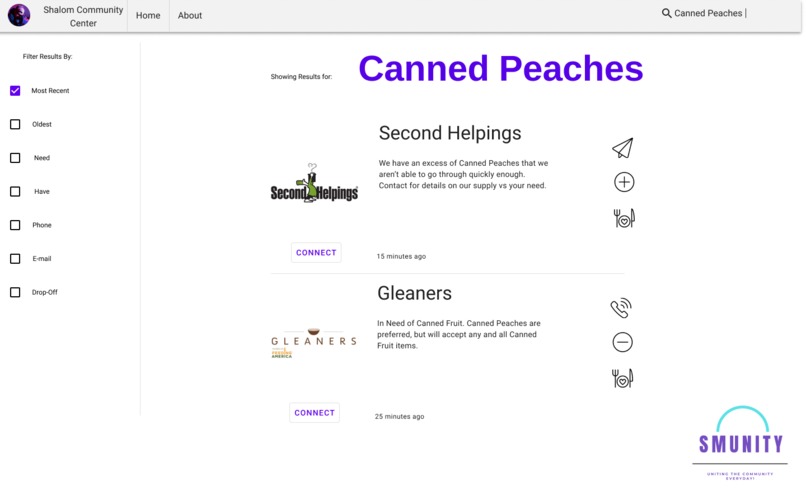
Search Page
-
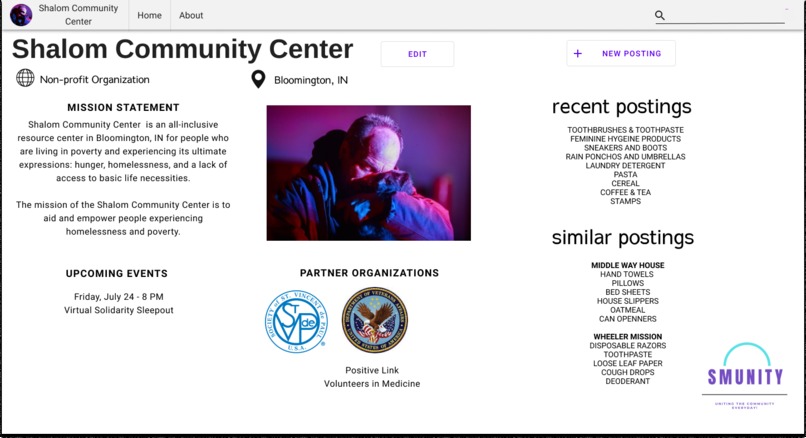
Profile Page
-
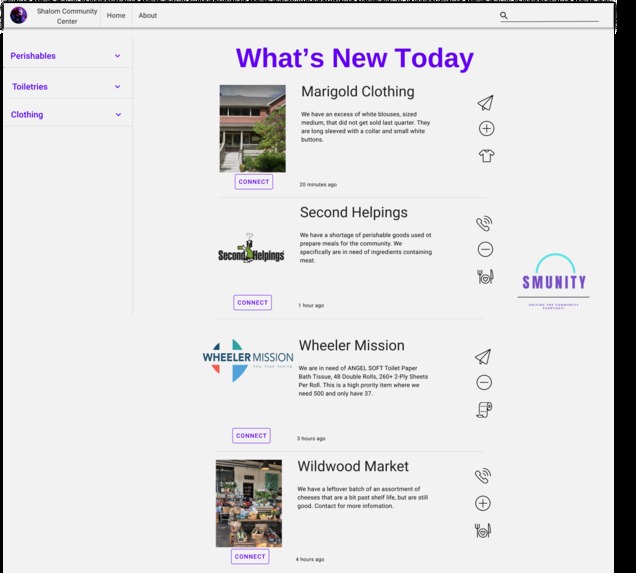
Home Page
Overview
Shelters and community pantries rely on food donations for their main source of supplies. The COVID-19 pandemic has dried out many of the normal donations they usually receive. Non-profit organizations lack an efficient network to source emergency services and goods for their clients. Our platform will help to improve communication between nonprofit organizations and its partnerships especially during times of emergency.
Team Members
Allizae Crayton (Economics, Data Analytics @ Purdue University) Allizae worked as part of the Go-Team to help create the go-to-market plan. More specifically, she helped to gather research on local non-profits, to better understand the problems they faced. She was also one of the presenting members.
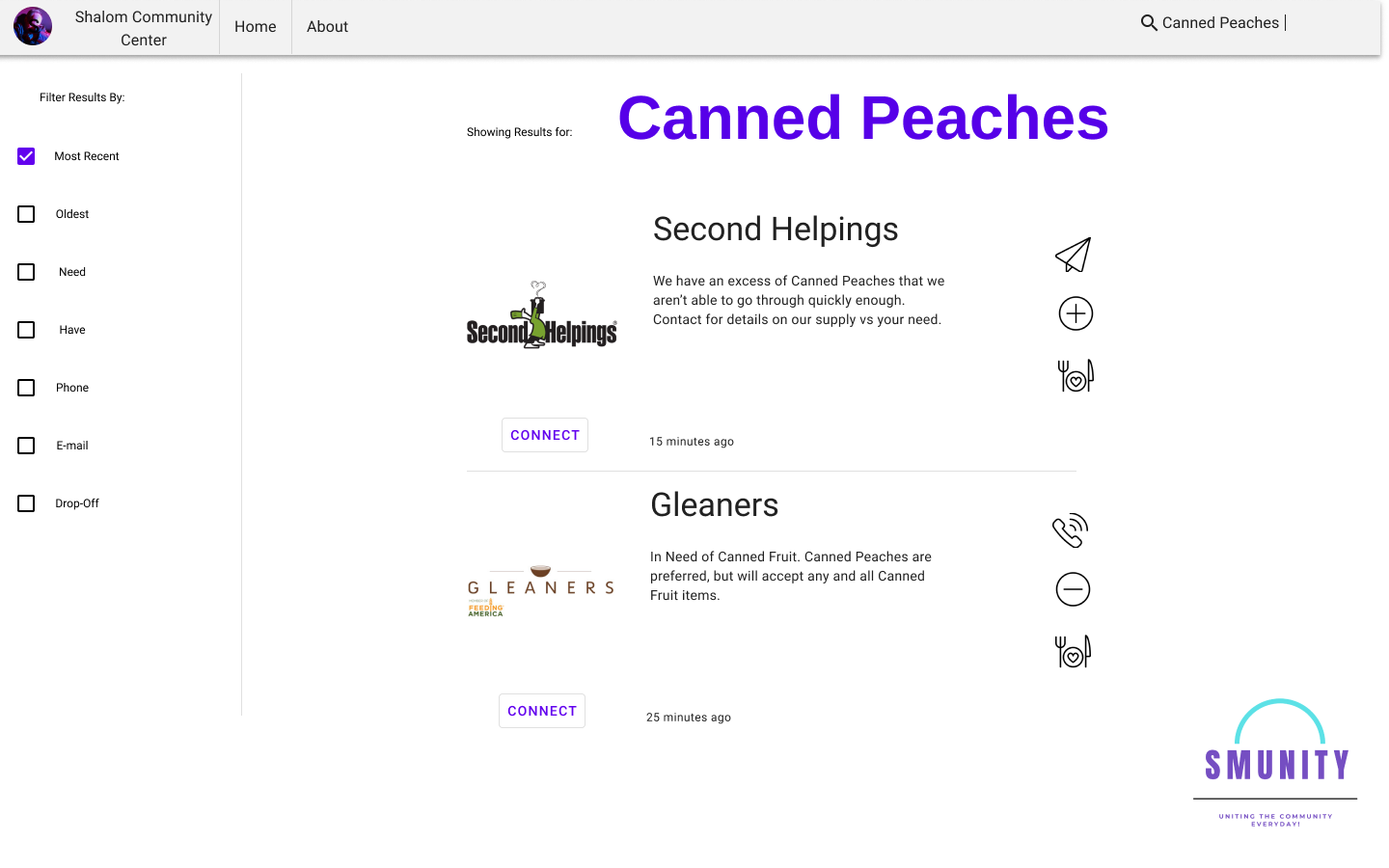
Joshua Johannsen (Computer Science and Creative Writing @ Ball State University) Joshua Johannsen worked alongside fellow Pro members to design and develop the layout of the website, as well as putting the prototype together and connecting the slides coherently. This mainly consisted of constructing the search for items pages (Canned Peaches) and the search for organization pages as well.
Kliffon Gibson (Business Administration @ Ivy Tech Community College) Kliffon contributed to the Go-team. Specifically, the Business Model Canvas and the PEST Environmental Analysis. These broke down the overall base plan in regards to the business side and finding factors inside of the environment that will affect the process of creating this product.
Sofia Cristina Varela-Hernandez (Business Development, Senior Marketing Major @ Valparaiso University) Sofia Crisitna worked alongside her fellow Go-squad peers on creating a go-to-market plan. Her more individualized project was creating a customer persona. This consisted of narrowing down the team's target market and reaching out to nonprofits for potential insight.
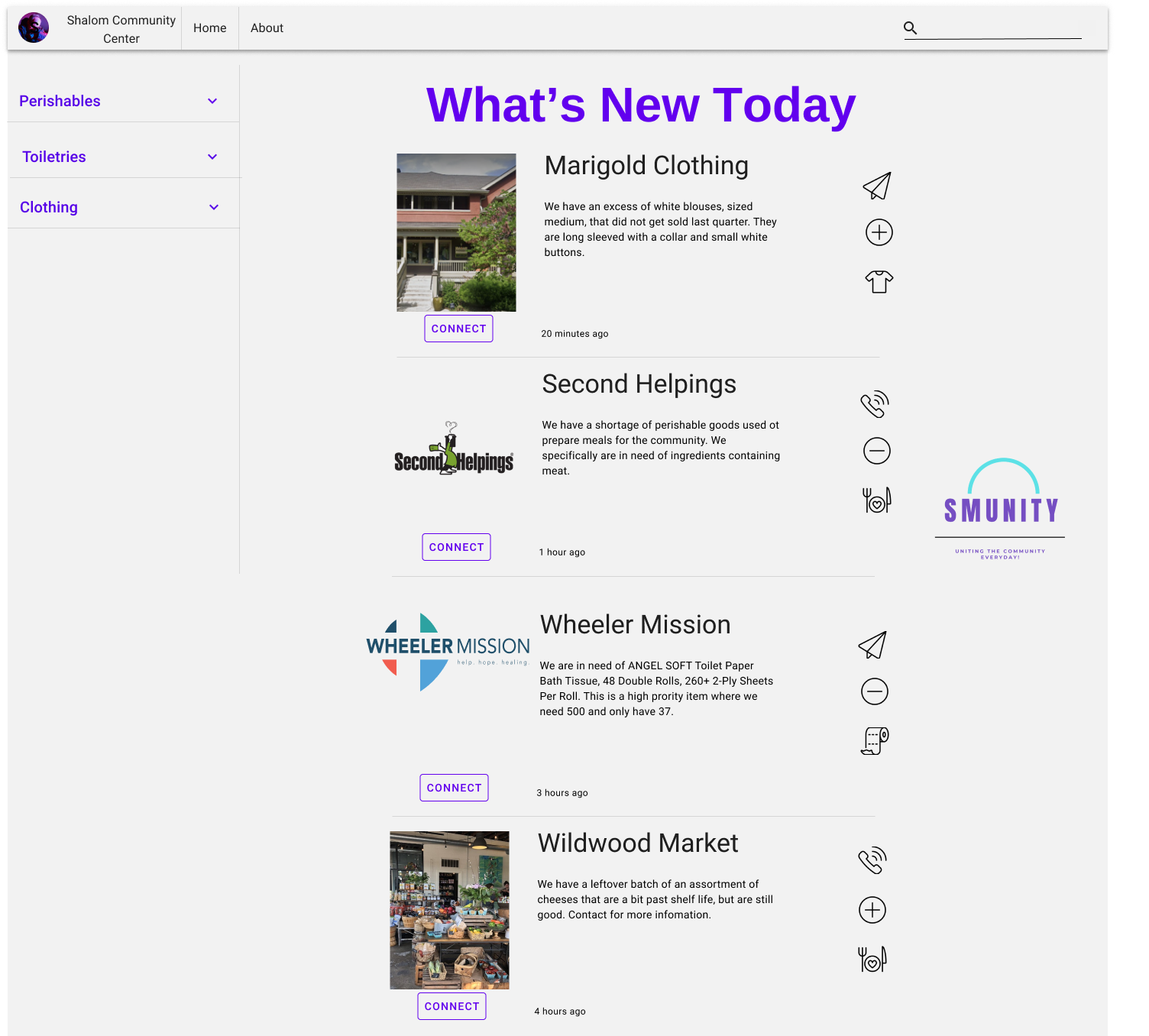
Lemara Williams (Computer Science, Music @ Amherst College) Lemara worked as Project Manager for the team. She organized schedules, meeting agendas, and overall kept the team on track of completing the benchmarks for the final product and submission. On the Pro-team, she contributed to the development of the prototype by building the home page, about page, and the log-in.
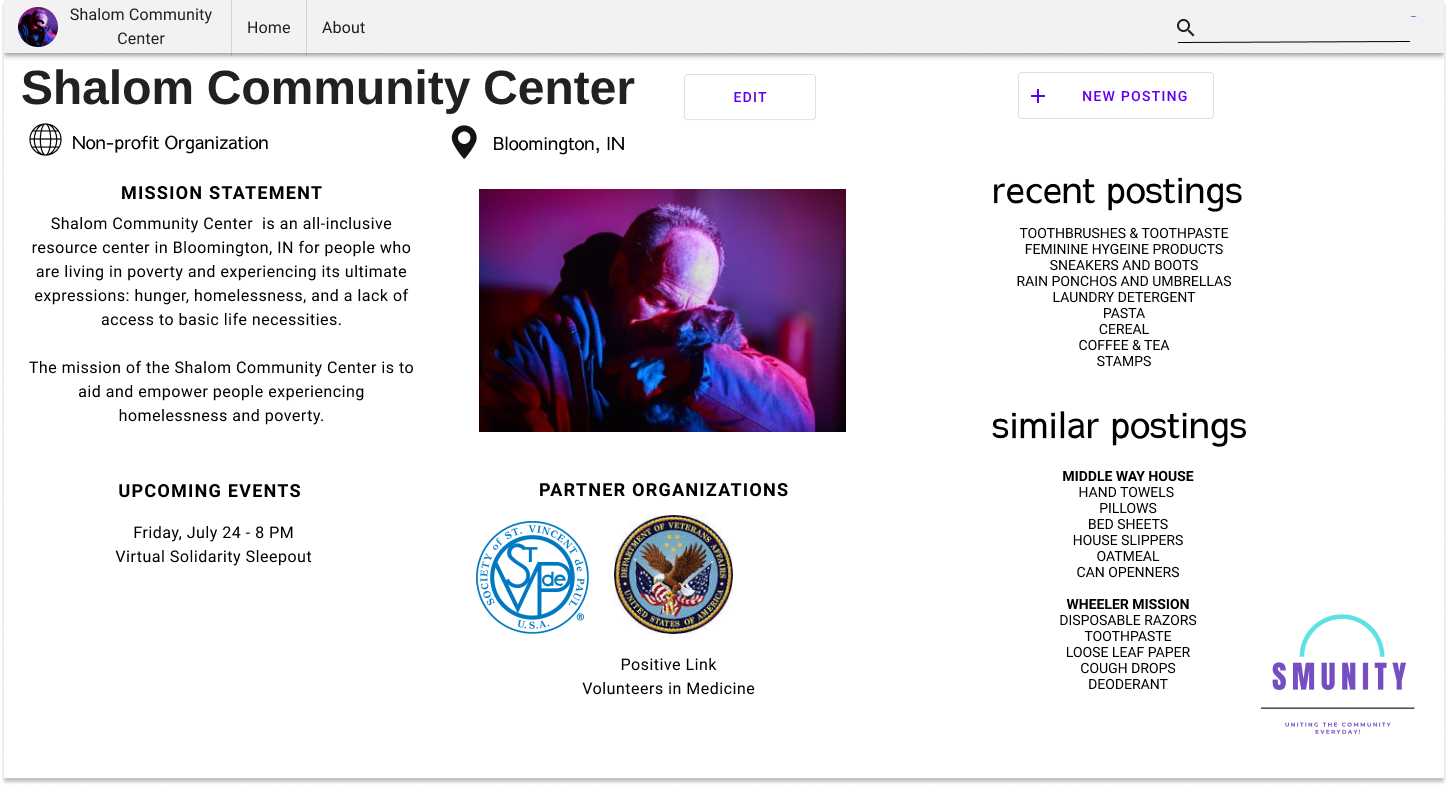
Janaya Woehnker (Epidemiology, Global Health Promotion, Healthcare Management, and Policy @ Indiana University - Bloomington) Janaya contributed to the Pro-team and the development of the prototype. Specifically, she tailored the format and functionality of the Profile page. This consisted of comprising a list of feasible and applicable features to incorporate into the prototype.
How did you decide on this customer segment, problem, and solution?
It was clear that our group wanted to focus on helping nonprofits that were facing difficulties due to COVID-19. Our first phase of the research process was to find the different organizations that were hit the hardest by the pandemic. Our research led us to focus on food pantries and donation-based organizations that were falling behind during this health crisis. It was apparent that COVID-19 caused these organizations’ donations to be dried up. Additionally, we came across articles that explained how many farmers were throwing out and burning food because of the lack of sales the farmers were facing.
Our next step was to brainstorm what type of solution we could create to alleviate some of the negative effects that the pandemic has caused these organizations. We also wanted to have a virtual platform that could maintain lucrative even after the COVID crisis, but that could also be very beneficial now. We began envisioning a platform that could connect different nonprofits. This would allow a bridge to be created for these organizations to offload their surplus resources to others in need, while also being able to acquire resources that they lack themselves. This would allow all nonprofits to have a good balance of supplies for their communities.
As we worked on this and faced different obstacles, we realized how hard it is to create connections with organizations. We tried reaching out to many different organizations and did not receive an answer from any of those we reached out to. If it was this difficult for us to create a connection with these nonprofits, then it must also be difficult for the organizations to connect. While building the platform for this project, we were also to see how a platform like this could drastically help other communities and originations that we might have not known about before.
How did your team build and iterate on the solution?
We focused on the prototype for rapid iteration. It would be better, in the long run, to know how to build something for free than to put resources and time into a product we would not be able to complete. We aimed to prioritize the user’s experience by having a clean interface and a simple user journey. The users should spend more time finding what they need rather than figuring out how the website works.
To start building the solution we used Trello to keep track of everyone’s tasks for the week; it also served as a home base for the team to document information found through research. After doing the research and deciding on our solution, we completed the typo journey of how we want the website laid out. Along with mapping the user journey, we knew, in detail, how we wanted our solution and the steps to get there. The iteration of our solution helped us to start developing in our building phase. We built two versions of a low-fidelity prototype and from there, developed our ideas into a high fidelity prototype. With the goal of it working just as good, or better, as a live website we took our time detailing our website mapping and the desired interaction between the product and the user. While the Pro-team was busy building, the Go-team was busy branding. We built our logo from scratch along with the name of our product, “Smunity”, the result of combining sharing and community. Our color scheme came from our logo. We improved our initial product from the input of those around us and the ideas of where we want this product to go.
Technical Architecture
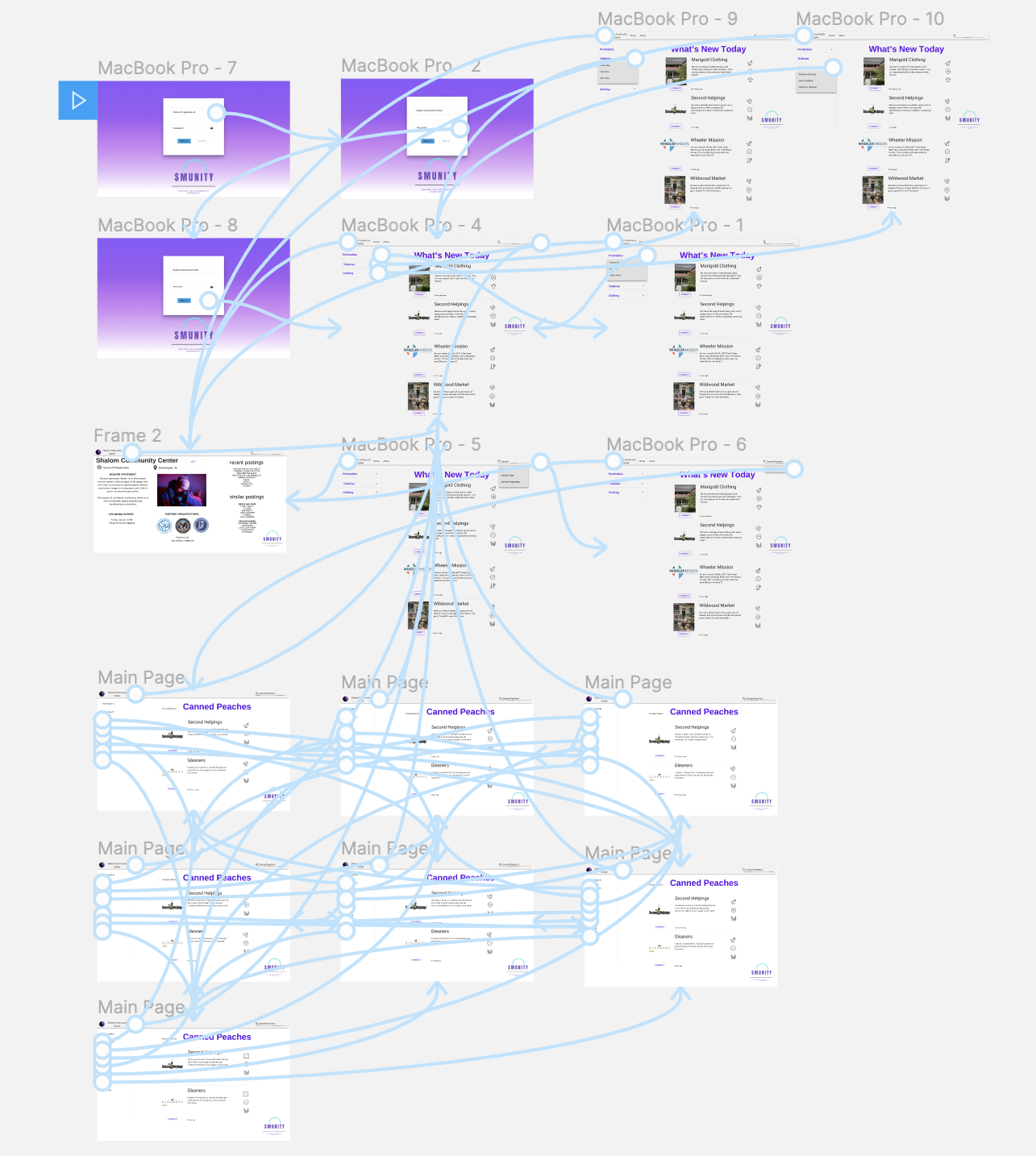
We decided that, based on the timeline of the challenge, we should focus on the interaction between users and proactively confirm the usability of our solution. So we wanted to make a simple platform that put ease of transition at the forefront. Our website mapping (attached) below shows the layers of our building. Inevitably, as you dive deeper into the website things get a little more complicated, but for the most part, there is an ease of movement where you can see where you will go.
Key Tools, Libraries, and Frameworks
In our solution, we used HTML/CSS, Figma, Material-UI, and Streamline. We chose HTML/CSS as it is straightforward in its usage and not at all difficult to manipulate within the time. We primarily used it for website design. We chose Figma as our solution to build on because compared to other platforms because it had the most encompassed capabilities; we also did not have to learn Sketch to use it. We primarily used Figma to frame and connect our different screens. It is what we use to walk through our prototype. Material.UI was used as an interface library for the designs in our solution. We chose it because it was, again, simple to use and also adds familiarity to our solution as when you are browsing you would probably already know what a button does because you have probably already interacted with it before. Streamline was used as a library for our different icons within the post. It is a pretty widely used plug-in on Figma and it also has an extensive amount of icons.
If you had another 5 weeks to work on this, what would you do next?
Smunity was developed to be implemented with four scheduled updates that would expand the functionality of the product from a network of non-profit organizations to a network that encompasses the entirety of the community.
As displayed in the prototype, the first phase of our product focuses on creating profitable and sustainable connections between non-profit organizations. Phase 1 is complete with a log-in process, a home page complete with a menu to filter results initially by perishables, toiletries and clothing, and additionally by time (oldest) with the most recent set as the default, status (need or have) and preferred method of contact (phone or email), along with a signal of donations where drop-off to the organization is preferred. Each posting includes the name and logo of the organization with a detailed description of the need or item in excess. The posting also includes icons to symbolize the preferred method of contact, status, and initial filter (perishables, toiletries, clothing). The connect button located under the posting will lead you to the profile site and contact information for the organization listed. A profile page is comprised of several features including the organization name (ex: Shalom Community Center, classification (ex: Non-Profit Organization), location (ex: Bloomington, IN), edit and new posting buttons, mission statement, a slideshow of pictures, upcoming events, partner organizations, and a condensed version of recent and similar postings. As the development expands, the classifications will be distinguished as Non-Profit Organizations, Business, Church, School, Individual Donor. The edit button will allow for edits to be made to all information located on the profile page including but not limited to outdated postings. The inclusion of these features is intended to spark interest in and awareness of the work of organizations in the community. Through individual donations, we hope that Smunity will help organizations to identify sustainable sources of donations and create a sustainable system of trade within the community.
Phase 2 is set to include Businesses, such as grocery stores and banks, to participate as donors and corporate sponsors for both resources and monetary needs. This addition will require the creation of a donation avenue, which can be developed on behalf of the organization through a third-party transfer system such as PayPal.
Phase 3 will allow for groups affiliated with schools, churches, or local service groups to create profiles and participate in donations. Phase 3 will also include an updated system for vetting and cybersecurity. Phase 3 will be completed with the implementation of a user agreement for registration and dual-login. The location icon will be programmed to connect to a Google Maps pop-up. Additional development and location services will allow organizations to view postings filtered by distance. Permission for use of location data will be included in the user agreement.
Phase 4 will require an updated server in preparation for the inclusion of individual donors from the community. Features for safety including the vetting process and flagging will be re-evaluated and updated to ensure the safety of all users. The user agreement will be updated to reflect all changes.


Log in or sign up for Devpost to join the conversation.