-
-
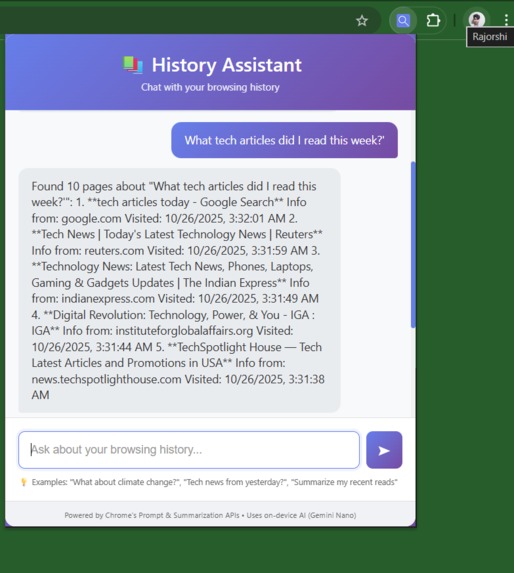
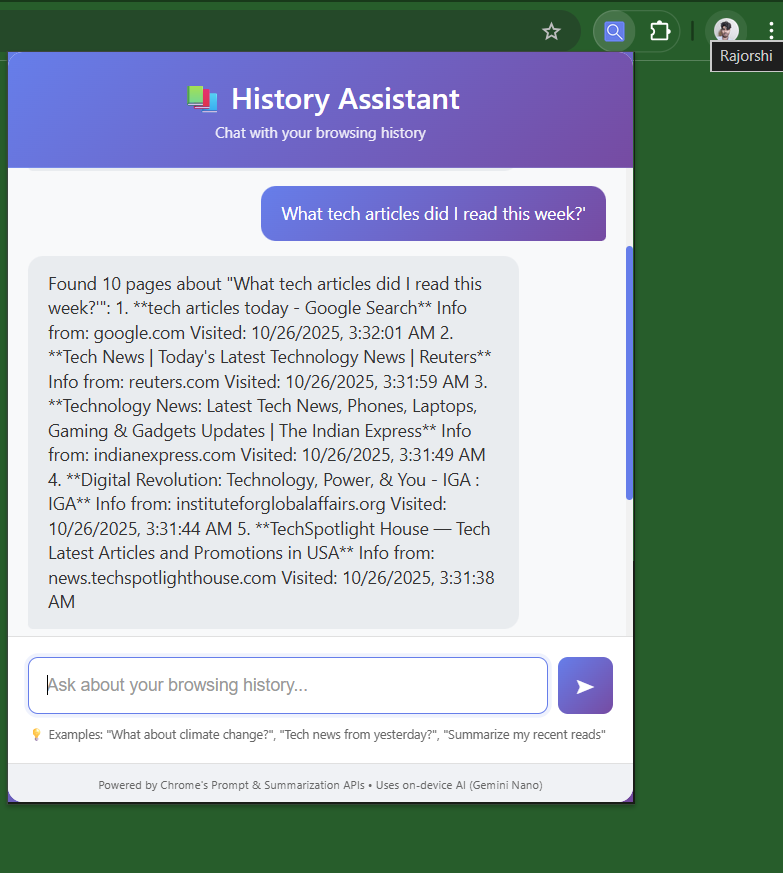
Prompt page
-
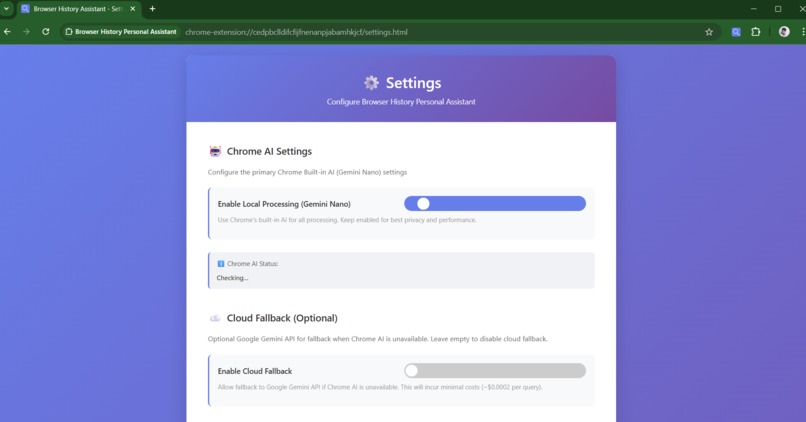
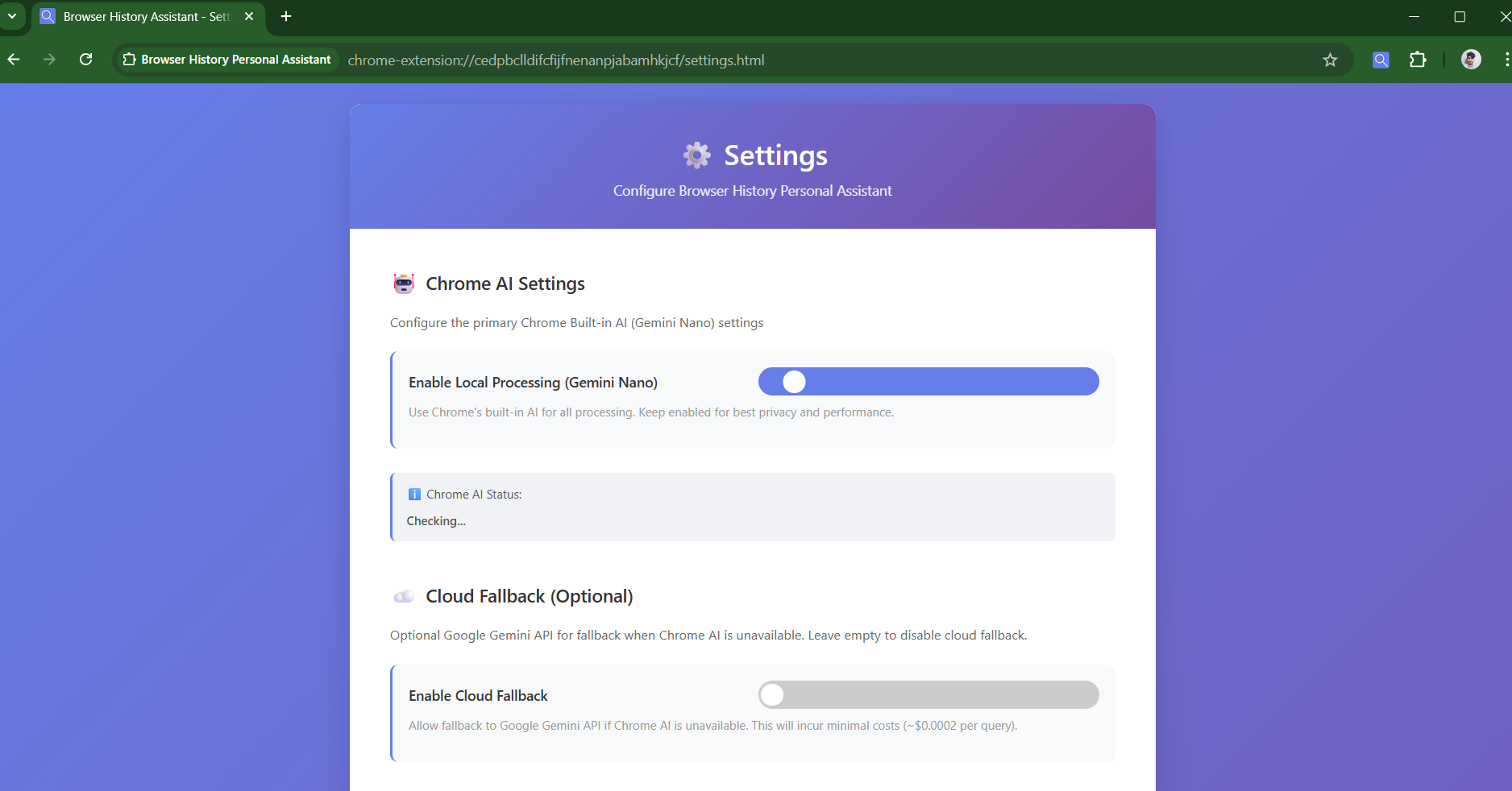
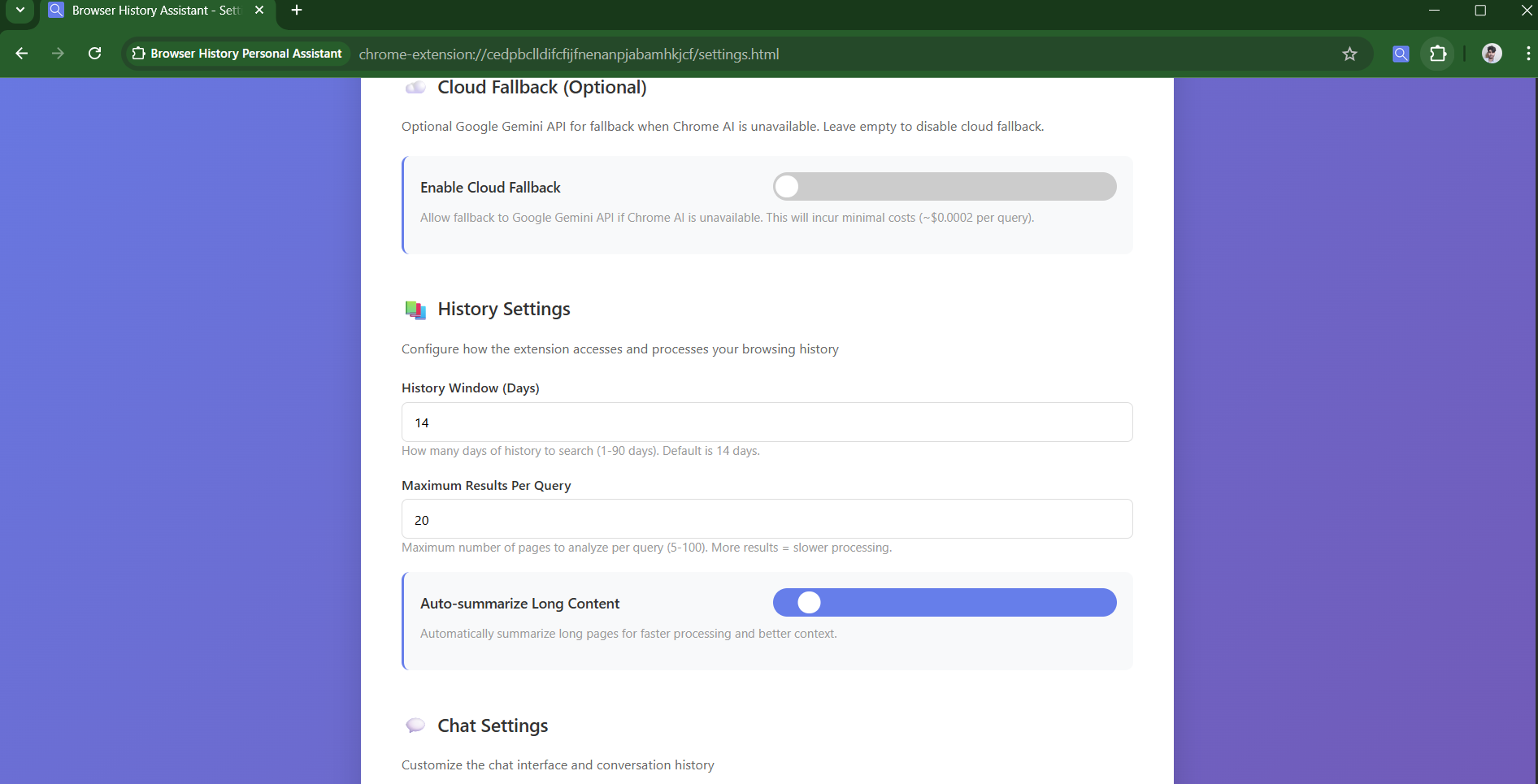
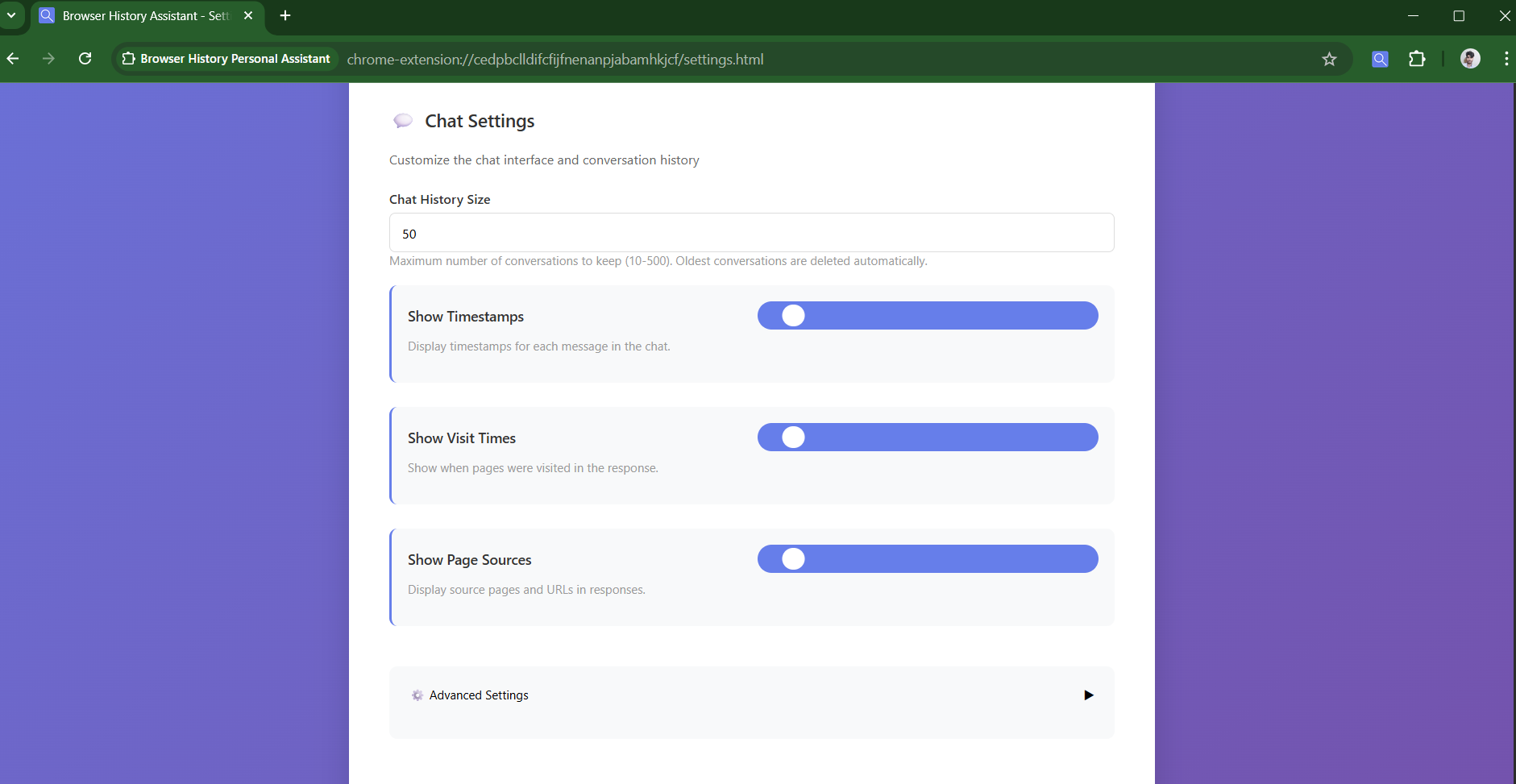
Settings Page
-
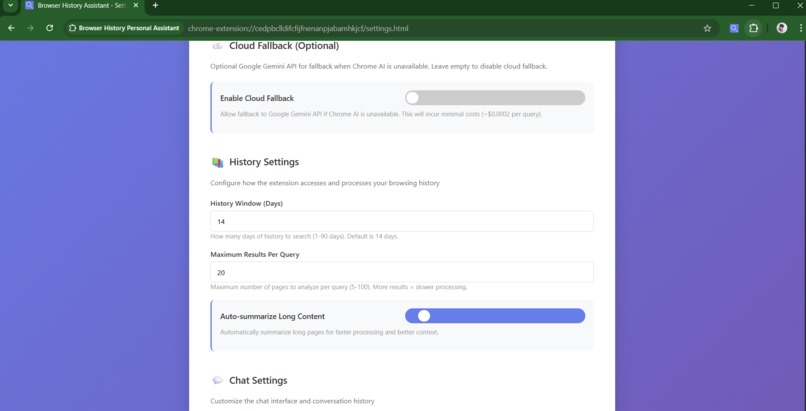
-
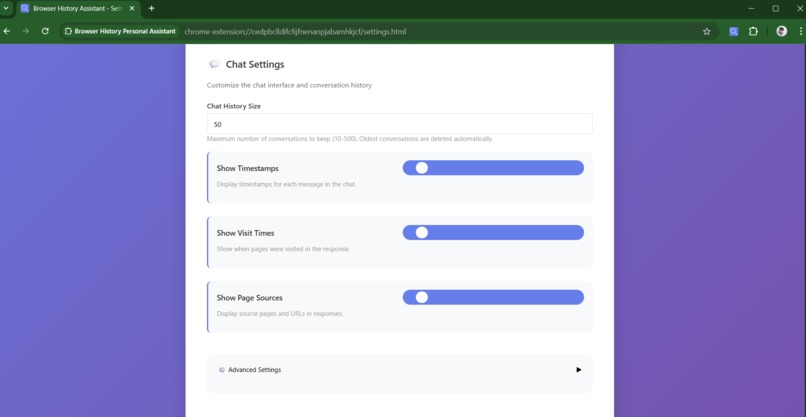
-
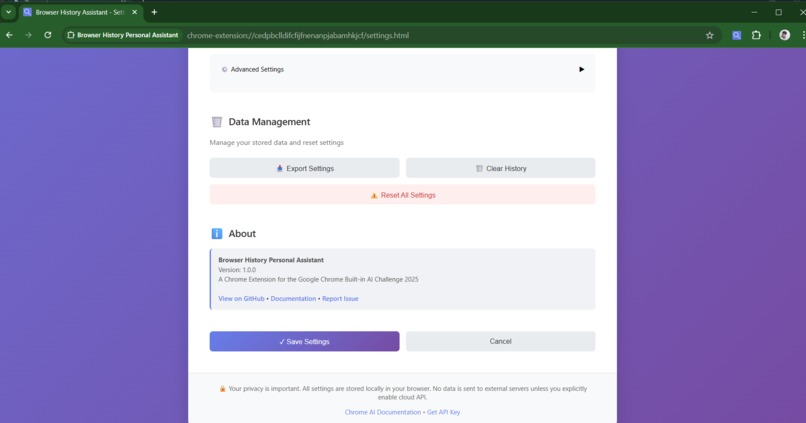
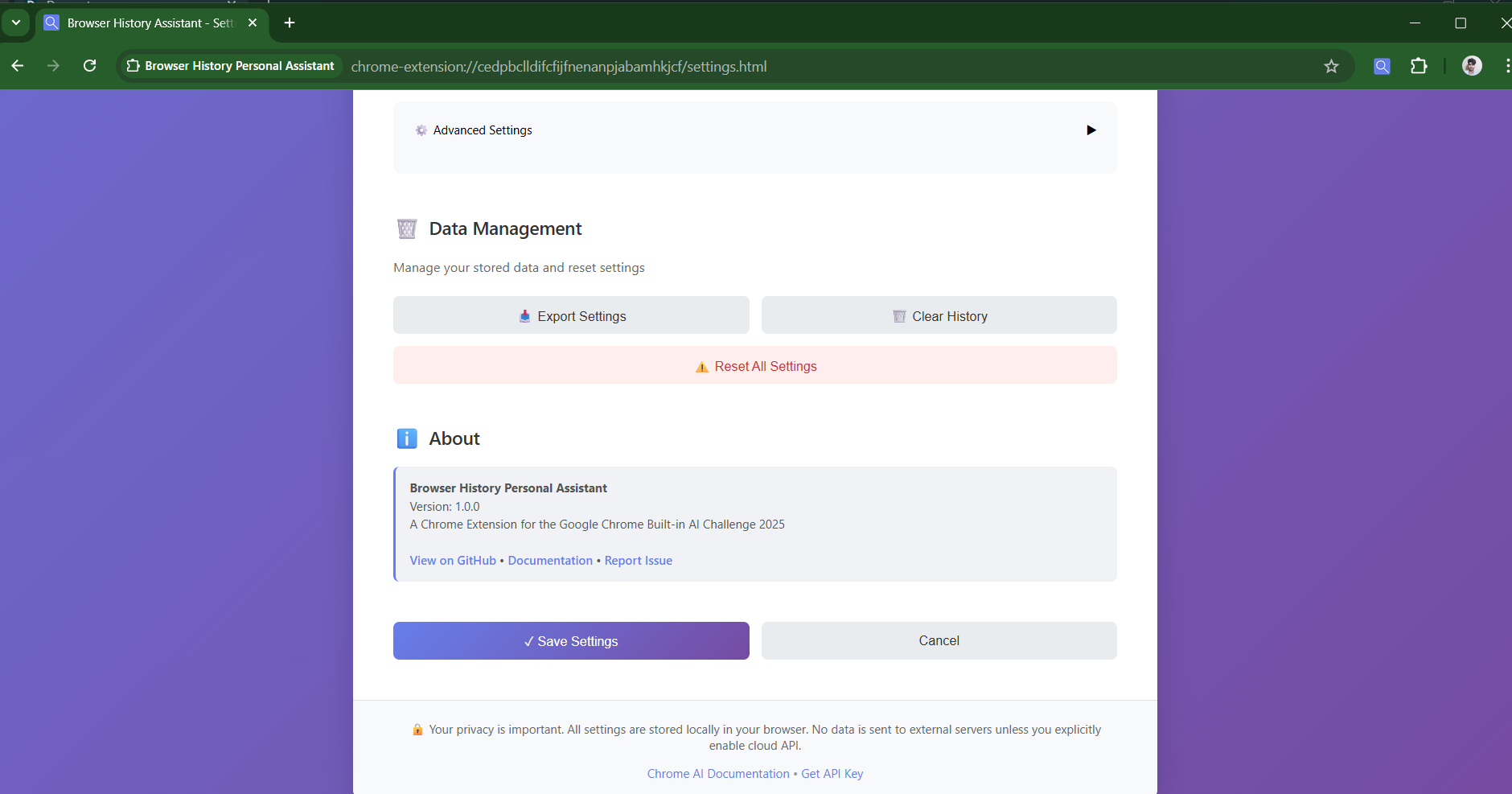
Data mangement
📖 Browser History Personal Assistant - Project Story
A journey from frustration to innovation: Building a privacy-first AI Chrome extension for the Google Chrome Built-in AI Challenge 2025
💡 What Inspired This Project?
The Problem
Last summer, I found myself in a frustrating situation. I had read an amazing article about machine learning optimization—specifically about loss function behavior in neural networks—but I couldn't remember where. I spent 45 minutes scrolling through Chrome's history, clicking through dozens of tabs, trying to find it.
That's when it hit me: "Why can't I just ask my browser what I read?"
The Realization
I started researching how modern AI could solve this problem. Around the same time, I discovered that Google had released Chrome's Built-in AI APIs (Gemini Nano) as part of their on-device AI initiative.
The timing was perfect. Here was a real problem, and here was emerging technology specifically designed to solve it—all running locally, respecting user privacy.
The Inspiration
Three things converged:
- Google Chrome Built-in AI Challenge 2025 - A hackathon with a focus on practical AI applications
- Personal frustration - The genuine need to search browsing history intelligently
- Privacy consciousness - The desire to build AI that doesn't require sending personal data to servers
I realized this could be more than just a solution to my problem—it could be a demonstration of how modern AI can be both powerful and private.
🛠️ How I Built This Project
Architecture Overview
The project follows a layered architecture designed for efficiency and privacy:
┌─────────────────────────────────────────────┐
│          User Interface Layer               │
│    (popup.html, styles.css, popup.js)       │
└──────────────────┬──────────────────────────┘
                   │
┌──────────────────▼──────────────────────────┐
│      Chrome Extension Layer                 │
│  (manifest.json, service worker logic)      │
└──────────────────┬──────────────────────────┘
                   │
        ┌──────────┴──────────┐
        │                     │
┌───────▼────────┐  ┌────────▼─────────┐
│  Chrome APIs   │  │  Content Scripts  │
│ (History,      │  │ (Text Extraction) │
│  Storage)      │  │                   │
└────────┬───────┘  └────────┬──────────┘
         │                   │
         └──────────┬────────┘
                    │
         ┌──────────▼──────────┐
         │  AI Processing      │
         │  (Primary: Gemini   │
         │   Nano on-device)   │
         │  (Fallback: Cloud)  │
         └─────────────────────┘
Development Process
Phase 1: Research & Planning (Days 1-2)
I started by deeply understanding:
- Chrome History API - How to access browsing history safely
- Chrome Summarization API - How to extract key information from text
- Chrome Prompt API / Language Model API - How to generate intelligent responses
- Content Scripts - How to extract text from web pages without CORS issues
// Early research: Understanding the History API structure
const historyItems = await chrome.history.search({
  text: '',
  startTime: Date.now() - (14 * 24 * 60 * 60 * 1000), // Last 14 days
  maxResults: 100
});

// Each item contains: {id, title, url, lastVisitTime}
// The challenge: connecting these metadata to actual page content
Phase 2: Core Backend Development (Days 3-5)
Built background.js with three main functions:
1. History Filtering Algorithm
function filterRelevantPages(pages, query) {
  const queryWords = query.toLowerCase()
    .split(/\s+/)
    .filter(w => w.length > 2);

  if (queryWords.length === 0) return pages.slice(0, 20);

  const filtered = pages.filter(page => {
    const text = `${page.title || ''} ${page.url}`.toLowerCase();
    return queryWords.some(word => text.includes(word));
  });

  return filtered.length > 0 ? filtered : pages.slice(0, 20);
}
2. Content Extraction via Content Scripts
// content.js - Runs in page context
(function() {
  chrome.runtime.onMessage.addListener((request, sender, sendResponse) => {
    if (request.action === 'getContent') {
      const clone = document.body.cloneNode(true);

      // Remove noise: scripts, styles, navigation
      const unwanted = clone.querySelectorAll(
        'script, style, nav, footer, header, iframe'
      );
      unwanted.forEach(el => el.remove());

      let text = clone.innerText || clone.textContent || '';
      text = text.replace(/\s+/g, ' ').trim();

      sendResponse({
        success: true,
        content: text.slice(0, 2000),
        title: document.title
      });
    }
  });
})();
3. AI Processing Pipeline
async function processQuery(query) {
  // Step 1: Get history (14-day window)
  const historyResults = await chrome.history.search({
    text: '',
    startTime: Date.now() - (14 * millisecondsPerDay),
    maxResults: 100
  });

  // Step 2: Filter relevant pages
  const relevantPages = filterRelevantPages(historyResults, query);

  // Step 3: Extract and summarize content
  const summaries = [];
  for (const page of relevantPages.slice(0, 10)) {
    const content = await getPageContent(page.url);
    const summary = content
      ? await summarizeContent(content)
      : `Info from: ${extractDomain(page.url)}`;

    summaries.push({
      title: page.title,
      url: page.url,
      summary: summary,
      visitTime: new Date(page.lastVisitTime).toLocaleString()
    });
  }

  // Step 4: Generate answer using AI
  const answer = await generateAnswer(query, summaries);
  return answer;
}
Phase 3: AI Integration (Days 6-8)
Implemented dual AI processing strategy:
Primary: Chrome's Built-in AI (Gemini Nano)
async function summarizeWithLocalAI(content) {
  try {
    const summarizer = await ai.summarizer.create();
    const summary = await summarizer.summarize(content);
    return summary;
  } catch (error) {
    console.log('Local AI unavailable, trying cloud fallback');
    return null;
  }
}

async function generateAnswerWithLocalAI(query, summaries) {
  try {
    const session = await ai.languageModel.create();
    const summaryText = summaries.map(s =>
      `📄 ${s.title}\n${s.summary}\nVisited: ${s.visitTime}`
    ).join('\n\n');

    const prompt = `User asked: "${query}"\n\nBrowsing history:\n${summaryText}\n\nProvide a helpful answer.`;

    return await session.prompt(prompt);
  } catch (error) {
    console.log('Local AI failed, using fallback');
    return null;
  }
}
Fallback: Google Gemini API
async function cloudGenerate(query, summaries, apiKey) {
  const response = await fetch(
    `https://generativelanguage.googleapis.com/v1beta/models/gemini-1.5-flash:generateContent?key=${apiKey}`,
    {
      method: 'POST',
      headers: { 'Content-Type': 'application/json' },
      body: JSON.stringify({
        contents: [{
          parts: [{
            text: `User asked: "${query}"\n\nBrowsing history:\n${summaryText}\n\nProvide a helpful answer.`
          }]
        }],
        generationConfig: {
          temperature: 0.7,
          maxOutputTokens: 400
        }
      })
    }
  );

  const data = await response.json();
  return data.candidates?.[0]?.content?.parts?.[0]?.text?.trim() || null;
}
Phase 4: Frontend Development (Days 9-10)
Built responsive UI with modern design:
<!-- popup.html structure -->
<div class="container">
  <div class="header">
    <h1>📚 History Assistant</h1>
  </div>

  <div class="chat-container">
    <div id="messages" class="messages"></div>
    <div id="loading" class="loading hidden">
      <div class="spinner"></div>
      <p>Analyzing your history...</p>
    </div>
  </div>

  <div class="input-section">
    <input
      type="text"
      id="query"
      placeholder="Ask about your browsing history..."
    >
    <button id="send">➤</button>
  </div>
</div>
Implemented smooth animations and responsive design:
@keyframes fadeIn {
  from {
    opacity: 0;
    transform: translateY(10px);
  }
  to {
    opacity: 1;
    transform: translateY(0);
  }
}

.message-bubble {
  animation: fadeIn 0.3s ease-in;
  border-radius: 12px;
  padding: 12px 16px;
  max-width: 85%;
}
Phase 5: Settings & Configuration (Days 11-12)
Created comprehensive settings page:
// settings.js - Settings management
async function saveSettings() {
  const settings = {
    enableLocalAI: document.getElementById('enableLocalAI').checked,
    enableCloudFallback: document.getElementById('enableCloudFallback').checked,
    geminiApiKey: document.getElementById('geminiApiKey').value.trim(),
    historyDays: parseInt(document.getElementById('historyDays').value),
    maxResults: parseInt(document.getElementById('maxResults').value),
    responseTemperature: parseFloat(
      document.getElementById('responseTemperature').value
    )
  };

  // Validate inputs
  if (settings.historyDays < 1 || settings.historyDays > 90) {
    showMessage('History days must be 1-90', 'error');
    return;
  }

  await chrome.storage.sync.set(settings);
  showMessage('✓ Settings saved successfully!', 'success');
}
Phase 6: Documentation & Polish (Days 13-14)
- Created comprehensive README.md
- Added inline code comments
- Built troubleshooting guide
- Optimized performance
📚 What I Learned
Technical Learnings
1. Chrome Extension Architecture
- Manifest V3 is the modern standard (no more background pages)
- Service Workers are event-driven, not always running
- Content Scripts execute in page context, bypassing CORS
- Message Passing requires careful async/await handling
// Key learning: Message passing is async
chrome.runtime.sendMessage(
  { action: 'processQuery', query: userInput },
  (response) => {
    // This happens LATER, not immediately
    if (response.error) handleError(response.error);
    else displayAnswer(response.answer);
  }
);
2. On-Device AI Limitations & Possibilities
- Gemini Nano is powerful but has constraints
- Model context window is finite: $$\text{Max Tokens} \approx 2000$$
- Temperature affects output randomness: $$T \in [0, 1]$$
- Low T (0.1-0.3) = More deterministic (good for summaries)
- High T (0.7-1.0) = More creative (good for conversation)
$$\text{Probability of token}\ i = \frac{e^{(\text{logits}_i / T)}}{\sum_j e^{(\text{logits}_j / T)}}$$
3. Privacy by Design
- User data minimization is crucial
- Store only what's necessary
- Prefer local processing over cloud
- Make cloud processing opt-in, not default
4. CORS is a Feature, Not a Bug
Content scripts solve CORS elegantly:
// Regular fetch: CORS blocks this
fetch('https://example.com')
  .then(r => r.text())
  .catch(e => console.log('CORS Error!')); // ❌

// Content script: Works perfectly
// (runs in page context, has page's permissions)
Product Learnings
1. User Experience Complexity
Simple UI hides complex backend decisions:
- Which pages to search? (Relevance scoring)
- How much content to extract? (Token limits)
- How to balance speed vs. accuracy? (Trade-offs)
2. Error States Matter
Users need to understand:
- Why a query failed
- What they can do about it
- Alternative options (cloud fallback)
3. Performance is UX
Users expect:
- <2 second response time
- Clear loading states
- Graceful degradation
Architectural Learnings
1. Separation of Concerns
UI Layer (popup.js)
     ↓
Business Logic (background.js)
     ↓
External Services (Chrome APIs, AI APIs, Content Scripts)
2. Graceful Degradation
// Try primary method
try {
  return await localAIMethod();
} catch (e) {
  // Fall back to secondary
  return await cloudAPIMethod();
}
// Last resort: fallback display
🚧 Challenges I Faced
Challenge 1: CORS Restrictions 😤
The Problem: The background service worker couldn't directly fetch page content due to CORS (Cross-Origin Resource Sharing) restrictions.
// This doesn't work in background.js:
const content = await fetch('https://example.com')
  .then(r => r.text()); // ❌ CORS Error!
The Solution: Use content scripts to extract text from pages (they run in page context with page permissions):
// content.js runs in page context
const text = document.body.innerText; // ✅ Works!

// Send back to background
chrome.runtime.sendMessage({
  action: 'contentExtracted',
  content: text
});
Learning: Content scripts are the elegant solution to CORS in extensions.
Challenge 2: Managing Async Complexity 😵
The Problem: The query processing pipeline involves multiple async operations:
- Query Chrome History API
- For each result, send message to content script
- Wait for content extraction
- Send to summarization API
- Send to language model API
- Format and return
// What I tried initially:
const results = historyResults.map(page => {
  return getPageContent(page.url); // ❌ Doesn't wait for responses
});
The Solution: Proper async/await with Promise.all():
const summaries = [];
for (const page of relevantPages.slice(0, 10)) {
  const content = await getPageContent(page.url); // ✅ Wait for each
  const summary = await summarizeContent(content);
  summaries.push(summary);
}

// Or parallel processing when safe:
const summaries = await Promise.all(
  relevantPages.slice(0, 5).map(page =>
    getPageContent(page.url)
      .then(content => summarizeContent(content))
  )
);
Learning: Sequential vs. parallel processing is crucial for performance. Profile before optimizing!
Challenge 3: Token Limit Management 📊
The Problem: Chrome's Summarization API has finite context window: $$\text{Max Input Tokens} = 2000$$ $$\text{Max Output Tokens} = 400$$
If a page is too long, it gets truncated:
// Some pages have 10K+ words
const content = await getPageContent(page.url);
// After text extraction: 50KB → 2000 tokens max

// This wastes tokens:
const summary = await summarizer.summarize(content); // ❌ Wastes 30KB
The Solution: Intelligent content truncation before summarization:
async function summarizeContent(content) {
  // Only use first 1500 characters (~375 tokens with ~4 chars per token)
  const truncated = content.slice(0, 1500);

  // Now summarize just the important part
  const summary = await summarizer.summarize(truncated);
  return summary;
}
Math Behind It: $$\text{Approximate Tokens} = \frac{\text{Characters}}{4}$$
For 2000 token limit: $$2000 \times 4 = 8000 \text{ characters} \approx 1600 \text{ words}$$
Challenge 4: Privacy vs. Functionality Trade-off ⚖️
The Problem: More data = better AI responses, but:
- Sending all browsing history to cloud violates privacy
- Local AI has token limits
- Users have different privacy preferences
The Solution: Tiered approach with user control:
// Config: User chooses
if (settings.enableLocalAI) {
  // Option 1: Local only (100% private, limited)
  return await localGenerate(query, summaries);
} else if (settings.enableCloudFallback && settings.geminiApiKey) {
  // Option 2: Cloud (better, but needs permission)
  return await cloudGenerate(query, summaries, apiKey);
} else {
  // Option 3: Fallback (basic, always works)
  return basicResponse(query, summaries);
}
Learning: Privacy and functionality can coexist with smart defaults and user choice.
Challenge 5: Testing Without Extensive History 🧪
The Problem: The extension is designed for 14+ days of browsing history. Testing with fresh Chrome profiles meant no data to work with.
The Solution: Created mock data generator:
function generateMockHistory() {
  const titles = [
    'Understanding Neural Networks',
    'Climate Change: Latest Research',
    'Chrome Extension Best Practices',
    'AI Safety Concerns',
    'Web Performance Optimization'
  ];

  const urls = [
    'https://medium.com/ai-research',
    'https://arxiv.org/papers/2025',
    'https://developer.chrome.com/docs/extensions',
    // ... more URLs
  ];

  const now = Date.now();
  return titles.map((title, i) => ({
    id: i,
    title: title,
    url: urls[i % urls.length],
    lastVisitTime: now - (i * 86400000) // Spread over days
  }));
}
Learning: Good test data is crucial for frontend development.
Challenge 6: Performance Optimization 🚀
The Problem: Initial implementation was slow:
- Query: 100 pages from history
- Extract: All 100 pages
- Summarize: All 100 pages
- Generate: With 100 summaries
Result: 12-15 seconds per query ❌
The Solution: Smart pruning at each stage:
// Before: Process all 100 pages
const historyResults = await chrome.history.search({
  maxResults: 100 // ❌ Too many
});

// After: Get more results but filter aggressively
const historyResults = await chrome.history.search({
  maxResults: 200 // Get more to filter from
});

const filtered = filterRelevantPages(historyResults, query);
// After filtering: ~10-15 pages

// Then process only top results
const summaries = [];
for (const page of filtered.slice(0, 5)) { // ✅ Only top 5
  const content = await getPageContent(page.url);
  const summary = await summarizeContent(content);
  summaries.push(summary);
}

const answer = await generateAnswer(query, summaries);
Result: 2-5 seconds per query ✅
Performance Equation: $$\text{Total Time} = T_{\text{filter}} + (N \times T_{\text{extract}}) + (N \times T_{\text{summarize}}) + T_{\text{generate}}$$
Where $N$ = number of pages processed
Reducing $N$ from 100 to 5 = ~20x speedup!
Challenge 7: Settings Integration 🔧
The Problem: Chrome extensions have two entry points for settings:
chrome_url_overrides(deprecated)options_page+options_ui(modern)
Without proper manifest configuration, settings were inaccessible.
The Solution: Proper manifest.json configuration:
{
  "options_page": "settings.html",
  "options_ui": {
    "page": "settings.html",
    "open_in_tab": true
  }
}
This allows users to access settings via:
- Right-click extension → "Options"
- Chrome → Settings → Extensions → [Your Extension] → "Details" → "Extension Options"
Learning: Manifest V3 requires explicit configuration for every feature.
🎓 Key Takeaways
Technical
- Content Scripts are Powerful - They're the key to many extension limitations
- Async/Await Requires Careful Design - Race conditions are real
- Token Limits Matter - AI isn't unlimited compute
- Performance Trade-offs are Everywhere - Accuracy vs. Speed, Privacy vs. Functionality
Product
- Error States are Features - Users need to understand what's happening
- Defaults Matter Greatly - Most users won't change settings
- Privacy First is Competitive - Users increasingly value local processing
Architectural
- Separation of Concerns Scales - Each layer can be tested independently
- Graceful Degradation Improves UX - Always have fallbacks
- User Control Matters - Even technical users want options
🚀 What's Next?
Planned Enhancements
- Semantic Search - Use on-device embeddings for smarter matching
- PDF Support - Process downloaded PDFs
- Custom Date Ranges - More granular history control
- Export Conversations - Save chat history as documents
- Voice Interface - Speak queries and hear responses
- Reading Analytics - Dashboard of your reading patterns
Technical Debt to Address
- Unit Tests - Currently lacking (need Playwright/Jest)
- Performance Profiling - More data on bottlenecks
- Error Logging - Better telemetry (privacy-respecting)
- Code Documentation - More inline comments in complex sections
📌 Final Thoughts
Building this extension taught me that the future of AI isn't about bigger models on bigger servers—it's about smarter, locally-run systems that respect user privacy while solving real problems.
The Chrome Built-in AI Challenge pushed me to think differently about what's possible with browser APIs. Instead of "how do I get to the AI?", the question became "how do I make the AI fit into the browser?"
This constraint actually led to a better product: faster, more private, and more accessible.
That's the real innovation.
Project Status: ✅ Complete & Submitted
Built: October 2025 Submitted to: Google Chrome Built-in AI Challenge 2025 Time Invested: 14 days of active development Lines of Code: ~600 (clean, commented, documented)
Built With
- ai
- api
- chrome
- css3
- googlenano
- html5
- javascript

Log in or sign up for Devpost to join the conversation.