-
-
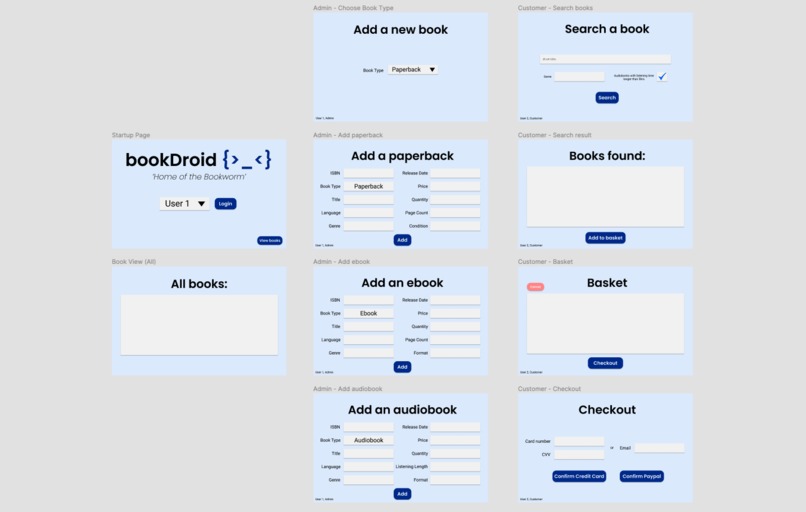
App layout design in Figma
-
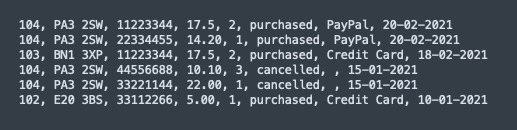
ActivityLog.txt - initial text file storing user activities (cancelled baskets/checkouts)
-
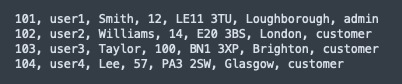
UserAccounts.txt - text file storing user details incl. account type (customer/admin)
-
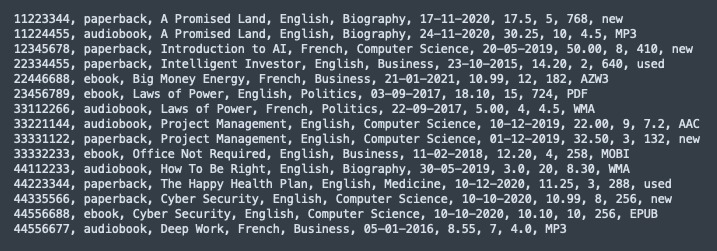
Stock.txt - initial text file storing all book stock


What it does / How to use
There are 2 user types: admin and customer (found in UserAccounts.txt). Both can view the whole collection of books, and are given the option to do so in the startup menu, which also provides a dropdown of usernames to select from. If the selected user is an admin, they will be prompted to choose a book type to add to the stock. Otherwise, customers will be prompted to search for books to add to their basket and can either checkout (credit card/Paypal) or cancel and clear the basket.
Each customer action (checkout/cancel) is logged and written to ActivityLog.txt, storing the following information:
- user ID; postcode; ISBN, price, book quantity, purchased/cancelled, payment method**, current date (dd-mm-yyyy)
The book data is stored in Stock.txt and each row contains information for a book in the following order:
- ISBN number
- book type (paperback/audiobook/ebook)
- title
- language
- genre
- release date
- price
- quantity
- page count / listening length (depending on type)
- condition / format (depending on type)
** Note: payment method is logged as " " for cancelled orders. **
How I built it
Layout designed in Figma. Built entirely with Java and Java Swing. Duration: 3 days
Accomplishments
Considering this was a fairly rushed project due to time constraints, I am pleased I was able to design and develop a functional application in such a short time frame, especially since this was my first attempt at GUI programming and also my first Java project.
What I learned
Bettered my object-oriented and GUI programming. Also learnt the scenarios where specific data structures are more efficient than others, for example, knowing when to use a HashSet over an ArrayList.

Log in or sign up for Devpost to join the conversation.